

Manual of product HL-L6310DW
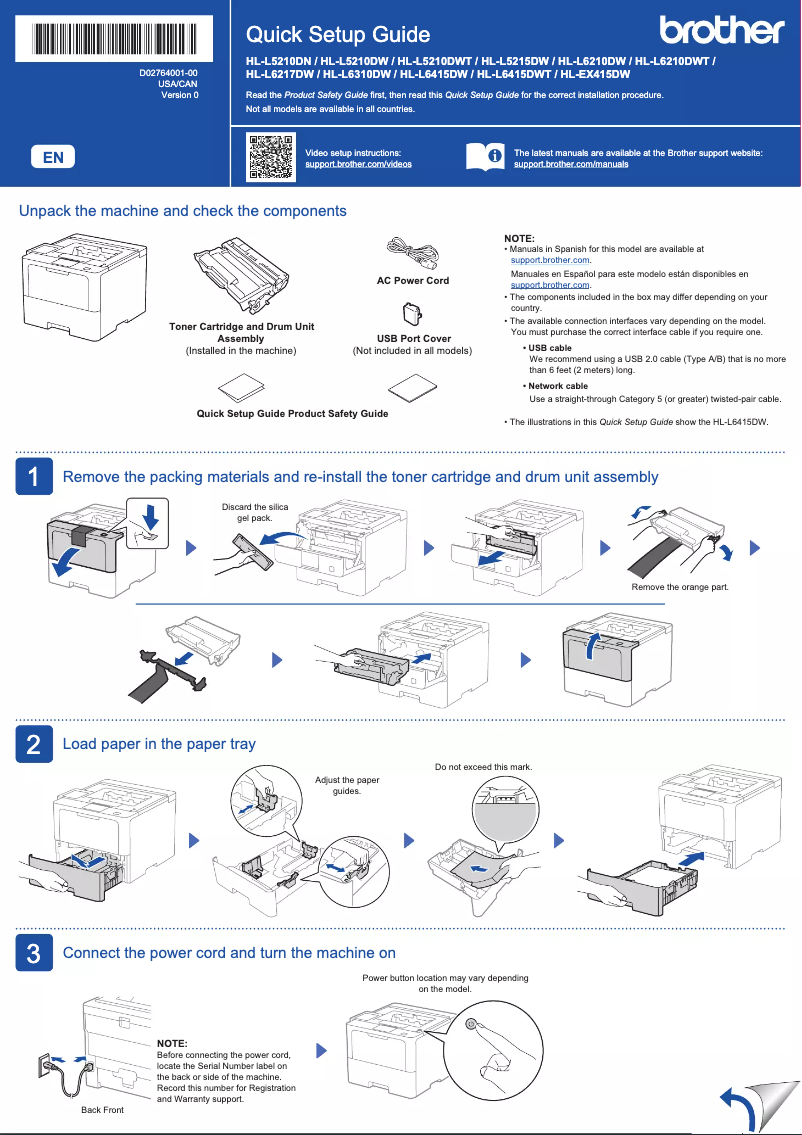
Editorial note
The Brother HL-L6310DW printer stands out for its exceptional performance, offering fast and high-quality printing, making it an ideal choice for demanding office environments. Wireless connectivity is a major asset, allowing easy printing from various devices, including smartphones and tablets. This provides appreciated flexibility of use. In terms of user experience, the model comes with a clear user manual, making setup and use easy, even for novices. Its durability and reliability are also noteworthy, with Brother being recognized for the quality of its products. However, the purchase price may be a barrier for small budgets, as it is relatively high compared to other printers in the same category. Additionally, toner cartridges can be expensive, increasing long-term operating costs. The printer can also be noisy during printing, which may disrupt a quiet work environment. Finally, its bulkiness may require significant office space, and the initial setup can be complex for less experienced users. In summary, the Brother HL-L6310DW is a high-performing and reliable printer, but its cost and size may limit its appeal for some users.Score details
User experience
The user experience is overall positive thanks to a clear user manual, making setup and use easier, even for novices.
Performance
Performance is excellent with fast and high-quality printing, ideal for demanding office environments.
connectivity
Wireless connectivity is a major asset, allowing easy printing from various devices like smartphones and tablets.
Value for money
The purchase price can be high compared to other printers in the same category, which may be a barrier for small budgets.
Robustness
Durability and reliability are strengths, with Brother being recognized for the quality of its products.
Usability
Installation and initial setup can be complicated for less experienced users, which may affect usability.
noise_level
The printer can be relatively noisy during printing, which may disrupt a quiet work environment.
size
It can be bulky and require a significant amount of desk space due to its size.
Advantages
Fast and high-quality printing
Wi-Fi connectivity for multiple devices
Energy savings and printing cost reduction
Easy to use even for beginners
Recognized durability and reliability of Brother
Disadvantages
High purchase price for small budgets
Expensive toner cartridges in the long run
Noisy during printing
Bulky, requires a lot of space
Complex installation for novice users
Technical Specifications HL-L6310DW
General Information
-
ModelHL-L6310DW
-
Brand
-
Category
-
Type
-
SKU1858100
-
MPN1858100
Frequently Asked Questions
What is the recommended method for removing jammed paper from the printer?
Why does my printer not recognize original cartridges?
What could be the reasons for poor print quality?
What is the difference between a laser printer and an inkjet printer?
Why does my inkjet printer leave black streaks on prints?
What does the acronym DPI mean?
Is the manual for the Brother HL-L6310DW available in French?
Similar products


More product categories from brand Brother
Home appliances Brother
Other Brother
Tools Brother
Phones Brother
Interior Brother
More product types from brand Brother


Presentation of product HL-L6310DW specifications from brand Brother
General Information
The Brother HL-L6310DW printer, produced by the well-known brand Brother, stands out for its combination of innovation and reliability in the printing device sector. This model, the HL-L6310DW, is designed to deliver superior performance, ensuring a smooth and enjoyable user experience.
Advantages
This printer is capable of producing fast, high-quality prints, thus meeting the demands of office environments where speed is essential. With its built-in Wi-Fi connectivity, it allows for easy wireless printing from a variety of devices, including smartphones and tablets, providing appreciated flexibility of use.
In terms of economy, the HL-L6310DW model is designed to be energy-efficient and uses high-capacity toner cartridges, which helps reduce printing costs in the long run. Its ease of use is another asset, as it comes with a clear manual, making setup easy even for those who are not familiar with technology.
Durability is also a strong point, as Brother is known for the quality of its products, thus ensuring appreciable longevity and reliability for prolonged use.
Disadvantages
However, the purchase price of the HL-L6310DW may be higher than that of other similar printers, which could pose a barrier for tight budgets. Additionally, toner cartridges may also incur additional long-term costs.
It is worth noting that the printer can be relatively noisy during the printing process, which could be disruptive in a quiet work environment. Its size, although justified by its features, may require significant office space. Finally, the installation and initial setup may pose challenges for less experienced computer users.


