

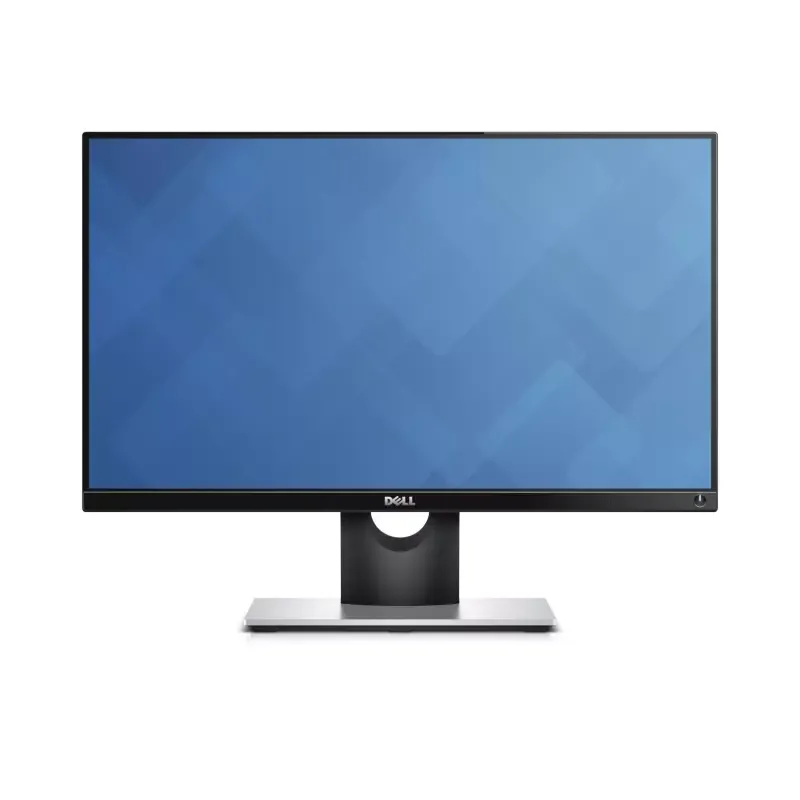
Manual of product Professional P2214H

Technical Specifications Professional P2214H
General Information
-
ModelPROFESSIONAL P2214H
-
Brand
-
Category
-
Type
-
SKU742073
-
MPN742073
Screen
-
Display technology-
-
Screen size21.5 "
-
Screen brightness (typical)
-
Screen resolution250 cd/m²
-
Response time
-
Contrast ratio1920 x 1080 pixels
-
Dynamic contrast report
-
Vertical viewing angle8 ms
-
Vertical viewing angle
-
Number of colors displayed1000:1
-
No pixel
-
Image format2000000:1
-
Horizontal viewable size
-
Vertical viewable size178 °
-
Touch screen
-
Type HD178 °
-
Supported graphic resolutions
-
Supported video modes16.78 million colors
-
Display area
-
Color palette0.248 x 0.248 mm
-
Image format
-
Touch screen16:9
-
-
476.06 mm
-
-
267.78 mm
-
-
No
-
-
Full HD
-
-
1920 x 1080 (HD 1080)
-
-
1080p
-
-
Matte
-
-
85 %
-
-
16:9
-
-
No
Other features
-
ScreenLED
-
Integrated TV tunerNo
-
Built-in power buttonYes
-
CertificationCECP, RoHS, TCO
-
Active display area (w x h)527.04 x 296.46 mm
Connectivity
-
Built-in USB hubYes
-
Number of upstream ports1
-
Built-in USB hubYes
-
Number of upstream ports1
-
Quantity of HDMI ports0
-
Number of downstream USB Type A ports4
-
Number of upstream ports1
-
Built-in USB hubYes
-
USB hub version2.0
-
Built-in USB hubYes
-
Number of upstream ports1
Multimedia
-
Built-in cameraNo
-
Built-in cameraNo
Design
-
Product colorBlack
-
Market positionProfessional
Thin client
-
Thin client installedNo
Ergonomics
-
Cable anti-theft lockNo
-
PivotYes
-
VESA standard100 x 100 mm
-
PivotYes
-
PivotYes
-
PivotYes
-
PivotYes
-
PivotYes
Power
-
AC input voltage100 - 240 V
-
AC input frequency50 - 60 Hz
-
Consumption (max)42 W
-
Electricity consumption (stop)0.3 W
-
Typical electricity consumption16 W
-
Input current1.2 A
-
Electricity consumption (stop)0.3 W
Environmental conditions
-
Operating temperature0 - 40 °C
-
Operating relative humidity (H-H)10 - 80 %
Sustainability
-
Sustainability certificatesEPEAT Gold
-
ENERGY STAR
Weight and dimensions
-
Device width (support included)565.6 mm
-
Depth (without support)47 mm
-
Height (without support)335.1 mm
-
Weight (without support)3510 g
-
Device width (support included)565.6 mm
-
Depth (support included)180 mm
-
Height (support included)499 mm
Packaging information
-
Package weight7790 g
Packaging contents
-
Cables includedAC
-
Quick Start GuideDisplayPort
-
Quick Start GuideUSB
-
VGA
-
Yes
-
Yes
Similar products


More product categories from brand Dell
Computers and accessories Dell
Other Dell
Audio Dell
Phones Dell
Software Dell
Interior Dell
More product types from brand Dell


Presentation of product Professional P2214H specifications from brand Dell
Generalities
The brand of the product Dell Professional P2214H is Dell. This brand is known for its quality and innovation in the field of household appliances. The product model Dell Professional P2214H is Professional P2214H | 210-AGXZ. This model ensures optimal performance and an enhanced user experience.
Other features
The Dell Professional P2214H screen contains LED. This screen offers exceptional image quality for an immersive visual experience. Does the product Dell Professional P2214H have a built-in TV tuner? No. This product does not allow you to receive television channels directly. The certification of the product Dell Professional P2214H contains CECP, RoHS, TCO. This certification guarantees compliance with the required safety and performance standards. Does the product Dell Professional P2214H have a built-in power button? Oui. This feature allows for simplified use and optimal control of the device. The active display area of the product Dell Professional P2214H is 527.04 x 296.46 mm. This dimension allows for an optimal visual experience for all your content.
Design
The color of the product Dell Professional P2214H is Noir. This shade gives it a modern and elegant look. The market position of the product Dell Professional P2214H is Professionnel. This product is primarily aimed at professionals, offering features tailored to their specific needs.
Connectivity
Does the product Dell Professional P2214H have HDCP? Oui. This specification ensures the protection of digital content against unauthorized copying. The number of VGA (D-Sub) ports on the Dell Professional P2214H is 1. This port allows for easy connection with various devices and monitors. The product Dell Professional P2214H does not have DVI-D ports. This feature may be important depending on your connectivity needs. Does the product Dell Professional P2214H have a DVI Port? Oui. This port allows you to connect devices with a digital video interface, ensuring optimal image quality. The number of HDMI ports on the Dell Professional P2214H is 0. This detail is essential for determining compatibility with your multimedia devices. The number of downstream USB Type A ports of the product Dell Professional P2214H is 4. These ports allow for easy and fast connection to various devices. The number of DisplayPort interfaces of the product Dell Professional P2214H is 1. This specification allows for optimal connectivity with various devices. The version of the USB hub of the product Dell Professional P2214H is 2.0. This version ensures fast and efficient connectivity for all your devices. Does the product Dell Professional P2214H have a built-in USB hub? Oui. This feature allows you to connect multiple USB devices simultaneously, thus enhancing your user experience. The number of upstream ports of the product Dell Professional P2214H is 1. This number determines the connection capacity with other devices. Does the product Dell Professional P2214H have a power input section? Oui. This section ensures a reliable and efficient power supply for the optimal operation of the device.
Multimedia
Does the product Dell Professional P2214H have built-in speakers? Non. These speakers provide an immersive and convenient audio experience. Does the Dell Professional P2214H have a built-in camera? Non. This camera allows you to capture precious moments with ease.
Screen
The screen size of the product Dell Professional P2214H is 21.5 ". This dimension allows for an optimal visual experience for all your content. The response time of the product Dell Professional P2214H is 8 ms. This fast response time ensures a smooth and responsive visual experience. The typical screen brightness of the product Dell Professional P2214H is 250 cd/m². This feature ensures optimal visibility in various lighting conditions. The screen resolution of the product Dell Professional P2214H is 1920 x 1080 pixels. This feature ensures optimal display quality for a pleasant visual experience. The display technology of the product Dell Professional P2214H is -. This technology ensures optimal image quality for an immersive visual experience. The contrast ratio of the product Dell Professional P2214H is 1000:1. A high contrast ratio makes images sharper and colors more vibrant, thus providing an enhanced visual experience. The dynamic contrast ratio of the product Dell Professional P2214H is 2000000:1. This ratio helps enhance image quality by providing deeper blacks and brighter whites. The horizontal viewing angle of the product Dell Professional P2214H is 178 °. This angle allows for optimal viewing from different angles, thus providing an immersive and comfortable experience. The vertical viewing angle of the Dell Professional P2214H is 178 °. This angle allows for optimal viewing from different angles, thus providing an enhanced visual experience. The number of colors displayed for the product Dell Professional P2214H is 16,78 millions de couleurs. This detail is essential for appreciating the visual quality of the screen. The pixel pitch of the product Dell Professional P2214H is 0.248 x 0.248 mm. This pixel pitch ensures optimal display quality without distortion. The image format of the product Dell Professional P2214H is 16:9. This format is ideal for an immersive visual experience. The horizontal viewable size of the product Dell Professional P2214H is 476.06 mm. This specification ensures an optimal visual experience for all your content. The vertical viewable size of the product Dell Professional P2214H is 267.78 mm. This dimension allows for an optimal visual experience for users. Does the product Dell Professional P2214H have 3D Compatibility? No. This product does not support 3D technology. The HD Type of the product Dell Professional P2214H is Full HD. This HD Type ensures exceptional image quality for an immersive viewing experience. The supported graphic resolutions of the product Dell Professional P2214H are 1920 x 1080 (HD 1080). These resolutions provide optimal display quality for your content. The image format of the product Dell Professional P2214H is 16:9. This format is ideal for an immersive visual experience. The supported video mode of the product Dell Professional P2214H is 1080p. This mode allows you to enjoy optimal image quality for your videos. The display area of the product Dell Professional P2214H is Mat. This area provides a pleasant visual experience and reduces glare. The color palette of the product Dell Professional P2214H is 85 %. This palette offers a variety of shades that enhance the product's aesthetics. Does the product Dell Professional P2214H have a touchscreen? Non.
Thin client
Does the product Dell Professional P2214H have Thin client installed? No. This product does not have this feature.
Ergonomics
Is the Dell Professional P2214H product Rotating? Oui. This feature allows for optimal usage flexibility. The product Dell Professional P2214H has the VESA Standard 100 x 100 mm. This standard ensures optimal compatibility with wall mounts and articulated arms, thus facilitating the installation and adjustment of your screen. Does the product Dell Professional P2214H have VESA Mounting? Oui. This feature allows you to easily attach your screen to a wall mount, thereby optimizing space and improving user comfort. Does the product Dell Professional P2214H have a cable lock port? No. This product does not have this security feature. Does the product Dell Professional P2214H have an Incline Adjustment? Oui. This feature allows you to adjust the angle according to your needs for optimal comfort. Does the product Dell Professional P2214H have a height adjustment? No. This product does not allow for height adjustment. Does the product Dell Professional P2214H have an on-screen display (OSD)? Oui. This display allows for intuitive navigation through the product settings. Does the product Dell Professional P2214H have Pivot? Oui. This feature allows for optimal flexibility to adapt to your needs.
Power
The AC input voltage of the Dell Professional P2214H is 100 - 240 V. This specification ensures optimal compatibility with standard electrical systems. The maximum consumption of the product Dell Professional P2214H is 42 W. This specification allows for the assessment of the energy efficiency of the device. The AC input frequency of the product Dell Professional P2214H is 50 - 60 Hz. This specification is essential to ensure optimal operation and compatibility with electrical systems. The energy consumption in standby mode of the product Dell Professional P2214H is 0.3 W. This feature helps reduce electricity consumption when the device is not in use, thus contributing to energy savings. The typical power consumption of the product Dell Professional P2214H is 16 W. This feature allows for the assessment of the energy efficiency of the device. The input current of the product Dell Professional P2214H is 1.2 A. This input current ensures optimal performance and increased energy efficiency. The power consumption (standby) of the product Dell Professional P2214H is 0.3 W. This feature helps to minimize energy consumption when the device is in standby mode.
Sustainability
The product Dell Professional P2214H has Sustainability Certificates: EPEAT Gold, ENERGY STAR. These certificates ensure that the product meets high standards for energy efficiency and environmental respect.
Environmental conditions
The operating temperature of the product Dell Professional P2214H is 0 - 40 °C. This specification ensures optimal performance within a temperature range suitable for various environments. The product Dell Professional P2214H has an operating relative humidity (H-H) of 10 - 80 %. This specification ensures optimal operation in a wide range of ambient humidity.
Packaging information
The weight of the Dell Professional P2214H package is 7790 g. This weight ensures optimal protection during transport and delivery.
Packaging contents
Does the product Dell Professional P2214H have a Quick Start Guide? Yes. This guide allows you to quickly and easily start using the product. Does the product Dell Professional P2214H have a User Manual? Oui. This document provides clear instructions for optimal use of the product. The included cable of the product Dell Professional P2214H contains a power plug. This cable is essential for ensuring an optimal electrical connection.
Weight and dimensions
The unsupported depth of the product Dell Professional P2214H is 47 mm. This dimension is essential to ensure optimal integration into your space. The width of the product Dell Professional P2214H is 565.6 mm. This dimension allows for optimal integration into various spaces. The height of the product Dell Professional P2214H is 335.1 mm. This dimension is essential to ensure the product fits your space. The weight of the product Dell Professional P2214H is 3510 g. This weight is essential for assessing the maneuverability and transport of the product. The width of the device Dell Professional P2214H is 565.6 mm. This dimension includes the stand, ensuring a seamless integration into your space. The depth of the product Dell Professional P2214H is 180 mm. This dimension is essential to ensure optimal integration into your space. The height (including support) of the product Dell Professional P2214H is 499 mm. This dimension is essential to ensure that the product fits perfectly in your space.


