

Manuals of product 1250c

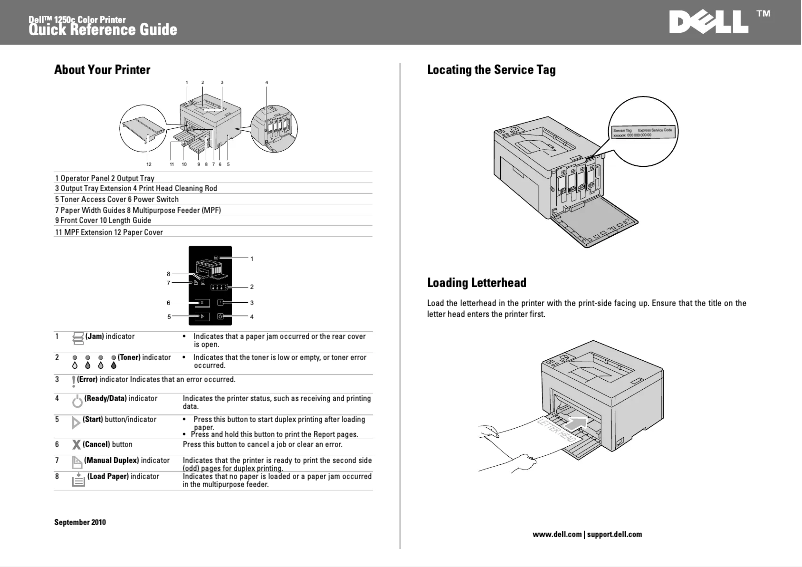
Editorial note
The Dell 1250c is presented as a sturdy desktop printer, offering high-quality printing with a maximum resolution of 600 x 600 DPI. Its printing speed is reasonable, with 12 pages per minute in black and 10 pages per minute in color, making it suitable for daily use in a work environment. Additionally, its 150-sheet paper capacity and maximum service cycle of 30,000 pages per month make it suitable for intensive use. However, several drawbacks are worth mentioning. The lack of duplex printing functionality limits paper usage efficiency, which could lead to higher printing costs. Furthermore, network connectivity is nonexistent, making it difficult to print from multiple wireless devices, a disadvantage in a modern office. Limited compatibility with Windows operating systems and the lack of support for Mac also restrict its use to a broader audience. Finally, its 64 MB internal memory may be insufficient to handle more complex printing tasks. In terms of user experience, the score is satisfactory, but improvements in connectivity and compatibility could enhance the experience. The printer's design is functional and fits well in a workspace, despite the lack of certain modern features. The value for money is fair, especially with the ENERGY STAR certification that attests to its energy efficiency. However, the features remain basic and may not meet the needs of all users. Finally, the provided documentation is comprehensive and helpful, although access to more accessible technical support could improve the overall experience. In summary, the Dell 1250c is an interesting option for those looking for a reliable printer with solid performance, but it may not be suitable for everyone due to its functional limitations.Score details
User experience
The user experience is generally satisfactory, but the lack of network connectivity and compatibility with Mac systems limits its use in modern environments.
Performance
The printing performance is good with a resolution of 600 x 600 DPI and adequate printing speeds, but the 64 MB internal memory may restrict efficiency during more complex tasks.
Design
The design is functional and the dimensions are suitable for an office space, but the lack of modern features like duplex printing is a drawback.
Value for money
The value for money is fair, especially with its 150-sheet paper capacity and ENERGY STAR certification, but the lack of certain features may pose a problem for some users.
Features
The features are basic: no duplex printing, no network connectivity, and incompatibility with Mac, which may be a barrier for some users.
Support
The available documents, such as the user manual and installation guide, are helpful, but more accessible technical support could improve the experience.
Documentation
The provided documentation is comprehensive with 176 pages, offering detailed information on the installation and use of the printer.
Advantages
High-quality print, 600 x 600 DPI.
Print speed: 12 ppm black, 10 ppm color.
Paper capacity: 150 sheets.
Duty cycle: 30,000 pages/month.
ENERGY STAR certified for energy efficiency.
Disadvantages
No double-sided printing.
No network connectivity.
Incompatible with Mac systems.
Relatively slow printing speed.
Insufficient internal memory of 64 MB.
Technical Specifications 1250c
General Information
-
Model1250C
-
Brand
-
Category
-
Type
-
SKU87610
-
MPN87610
Print speed
-
ColorYes
-
Maximum resolution600 x 600 DPI
-
Print speed (black, normal quality, A4/US Letter)12 ppm
-
Print speed (color, normal quality, A4/US Letter)10 ppm
-
Double-sided printingNo
Representation / realization
-
Processor frequency192 MHz
-
Internal memory64 MB
-
Maximum internal memory- MB
Input and output capacity
-
Total power capacity150 sheets
-
Total output capacity100 sheets
Features
-
Service cycle (Maximum)30000 pages per month
-
Languages of the page descriptionGDI
Paper management
-
Maximum ISO A series paper sizeA4
-
Type of paper tray supportEnvelopes, Labels, Plain paper, Recycled paper
-
Maximum print format210 x 297 mm
-
Maximum ISO A series paper sizeA4
Network
-
WifiNo
-
WifiNo
-
WifiNo
Other features
-
Mac CompatibilityYes
-
Compatible operating systemsMicrosoft Windows 7/Vista/2008/XP/2003
-
Mac OS: 10.3.9+/10.4.11+/10.5/10.6
Sustainability
-
Sustainability certificatesENERGY STAR
Power
-
Average power consumption in Print modeW
Weight and dimensions
-
Dimensions (LxWxH)394 x 300 x 225 mm
-
Weight11000 g
Design
-
Screen-
-
CertificationRoHS
Frequently Asked Questions
What is the weight of the Dell 1250c?
What is the recommended method for removing paper jammed in the printer?
Why is my printer not recognizing the original cartridges?
What could be the causes of poor print quality?
What is the difference between a laser printer and an inkjet printer?
Why does my inkjet printer leave black streaks on prints?
What does the acronym DPI mean?
What certifications does the Dell 1250c have?
Is the manual for the Dell 1250c available in French?
Similar products


More product categories from brand Dell
Computers and accessories Dell
Other Dell
Audio Dell
Phones Dell
Software Dell
Interior Dell
More product types from brand Dell


Presentation of product 1250c specifications from brand Dell
General Information
The Dell 1250c is a printer from the Dell brand, known for its commitment to quality and innovation in the electronics sector. The 1250c model, identified by the number 210-33759, is designed to deliver exceptional performance and a smooth user experience. The EAN code, which ensures unique identification in distribution systems, includes 5391519474167, 5391519542842, and 5397063054077.
Print Speed
This printer is capable of producing color prints, which is an asset for aligning with your aesthetic preferences. Its maximum resolution of 600 x 600 DPI ensures remarkable clarity, suitable for both professional needs and personal prints. The print speed is 12 pages per minute (ppm) for black documents and 10 ppm for color prints. However, the lack of duplex printing may limit efficiency in paper usage.
Performance / Execution
The printer's processor operates at a frequency of 192 MHz, thus determining the speed of task execution. Equipped with 64 MB of internal memory, the Dell 1250c allows for sufficient storage for smooth operation, although this memory may prove limited for more complex prints.
Input and Output Capacity
The total paper capacity of the printer is 150 sheets, allowing it to handle a significant volume of documents without requiring frequent reloads. In terms of output, it can manage up to 100 sheets, ensuring adequate performance for regular use.
Features
The maximum service cycle of the 1250c model is 30,000 pages per month, making it suitable for intensive use by demanding users. Additionally, this printer uses a GDI page description language, offering some flexibility for users.
Paper Management
The Dell 1250c is compatible with standard A-series paper formats, such as A4 and A5. The paper tray can accommodate various types of media, including envelopes, labels, plain paper, and recycled paper, which expands printing possibilities. The maximum print size is 210 x 297 mm, ensuring optimal quality for larger documents.
Network
It is important to note that the Dell 1250c is not equipped with network features, making wireless printing from multiple devices impossible. Furthermore, it does not support Ethernet/LAN connections or Wi-Fi, which limits connectivity in modern office environments.
Other Features
This printer is not compatible with Mac operating systems, which may restrict its use for some users. However, it works with Windows XP, Windows Vista, and Windows 7, ensuring smooth operation on these platforms.
Durability
The Dell 1250c is ENERGY STAR certified, attesting to its compliance with high energy efficiency standards and its reduced environmental impact.
Power
Regarding energy efficiency, the power consumption in print mode should be considered for a complete evaluation of the device.
Weight and Dimensions
The dimensions of the printer are 394 x 300 x 225 mm, allowing for easy adjustment in various workspaces. Its weight of 11,000 g is a factor to consider for handling and installation.
Design
Although the printer does not have a display, it is designed to offer functional performance. The RoHS certification also ensures its compliance with required safety and performance standards.


