

Manuals of product L386
Editorial note
The Epson L386 is a multifunction printer that stands out for its remarkable print quality, thanks to a maximum resolution of 5760 x 1440 DPI. This feature ensures documents and images of exceptional clarity, ideal for both professional and personal use. Its print speed reaches 33 pages per minute in black, which is very appreciated for daily use. Additionally, the manual duplex printing feature allows for optimized paper usage, which is an ecological and economical advantage. However, some drawbacks are worth noting. The color print speed, limited to 15 pages per minute, may be insufficient for users with frequent or large printing needs. Furthermore, the manual duplex mode requires user intervention, which can be less convenient for high-volume printing. The output capacity of only 30 sheets and the lack of an integrated fax machine may also restrict its effectiveness for some professionals. In terms of user experience, the Epson L386 offers an intuitive interface and adequate features, but the documentation could be improved to better assist users. In terms of design, this device sports a modern black finish that fits perfectly into a work or home environment. In summary, the Epson L386 offers good value for money, particularly due to its interesting features like Wi-Fi connectivity and color scanning capabilities. However, the limitations in color print speed and output capacity may disappoint some users.Score details
User experience
The user experience is satisfactory, thanks to an intuitive interface and adequate features, although the manual duplex printing mode requires user intervention.
Performance
The printing performance is generally good, but the color printing speed of 15 ppm may be insufficient for users with high printing needs.
Design
The design is modern and sleek, with a black finish that fits well in a professional or home environment.
Value for money
The value for money is fair, especially considering the features offered, although some limitations like the lack of a fax machine may disappoint some users.
Features
Features such as a print resolution of 5760 x 1440 DPI and Wi-Fi connectivity add significant value to the product, making it easier to print from various devices.
Usability
The use of the printer is generally easy, but the output capacity of 30 sheets and the manual duplex printing mode may limit its effectiveness for high-volume printing.
Support
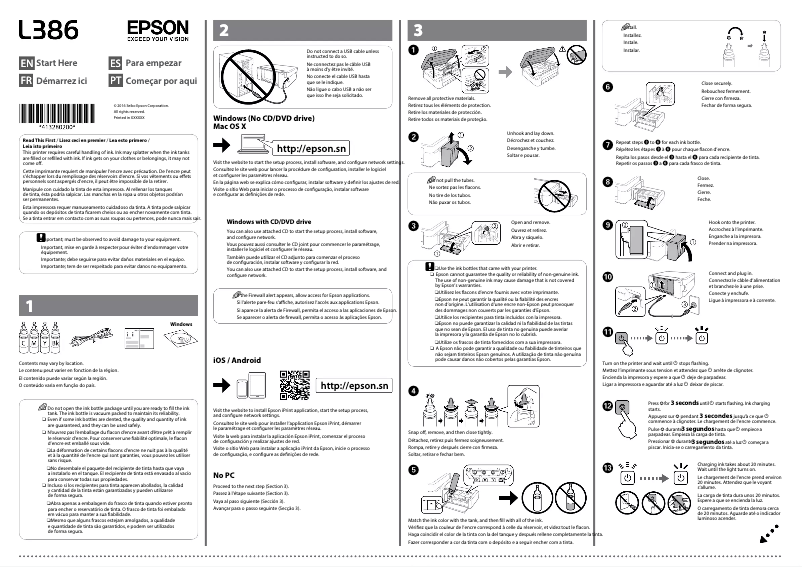
The presence of a quick installation guide and a software CD makes setup easy, although the documentation could be improved to cover more details.
Advantages
High-quality printing up to 5760 x 1440 DPI
Print speed of 33 ppm in black
Manual duplex printing eco-friendly
Color scanning up to 1200 x 2400 DPI
Wi-Fi connectivity for wireless printing
Disadvantages
Slow color print speed
Manual duplex printing
Output capacity limited to 30 sheets
No built-in fax
No Ethernet connectivity
Internal memory of 0 MB
Technical Specifications L386
General Information
-
ModelL386
-
Brand
-
Category
-
Type
-
SKU1853562
-
MPN1853562
Print speed
-
Printing technologyInkjet
-
PrintingColor printing
-
Duplex printing modeManual
-
Print speed (black, normal quality, A4/US Letter)33 ppm
-
Maximum resolution5760 x 1440 DPI
-
Print speed (color, normal quality, A4/US Letter)15 ppm
-
Double-sided printingYes
Copier
-
CopyColor copy
-
Max. resolution of copies- DPI
Digitization
-
DigitizationColor scanning
-
Optical scanning resolution1200 x 2400 DPI
-
Supported image formatsBMP, JPG, TIF
-
Support for text formatsPDF
-
Scanning technologyCIS
Fax
-
FaxNo
Features
-
Digital sender-
-
Languages of the page description-
-
Service cycle (Maximum)- pages per month
-
Number of print cartridges4
-
Printing colorsBlack, Cyan, Magenta, Yellow
Design
-
Market positionDomestic and professional
-
Product colorBlack
-
Built-in screenNo
Input and output capacity
-
Total power capacity100 sheets
-
Total output capacity30 sheets
-
Paper feed typePaper bin
-
Total number of power supply units1
Paper management
-
Maximum ISO A series paper sizeA4
-
Type of paper tray supportPhoto paper, Plain paper
-
ISO, Format Series A (A0...A9)A4, A5, A6
-
ISO, Formats Series-B (B0...B9)B5
-
Envelope sizes10, C6, DL
-
Non-ISO print support sizesLegal (media size), Letter (media size)
-
Photo paper formats10x15, 13x18 cm
Representation / realization
-
Internal memory0 MB
-
Built-in memory card readerNo
Connectivity
-
USB portYes
-
USB portYes
Network
-
WifiYes
-
Ethernet/LANNo
-
Security-supported algorithm64-bit WEP, 128-bit WEP, WPA-AES, WPA-PSK, WPA-TKIP
-
Mobile printing technologiesEpson Connect, Epson Email Print, Epson IPrint
Power
-
Electricity consumption (average operation)- W
-
Average power consumption in Copy mode11 W
-
Energy consumption (loan)3.6 W
-
Electricity consumption (stop)0.3 W
-
Energy consumption (in standby mode)1.3 W
-
AC input voltage110 - 240 V
-
AC input frequency50 - 60 Hz
Minimum system requirements
-
Support for the Windows operating systemYes
-
Support for the Mac operating systemMac OS X 10.10 Yosemite
-
Mac OS X 10.6 Snow Leopard
-
Mac OS X 10.7 Lion
-
Mac OS X 10.8 Mountain Lion
-
Mac OS X 10.9 Mavericks
Weight and dimensions
-
Width482 mm
-
Depth300 mm
-
Height145 mm
-
Weight4500 g
Packaging contents
-
Warranty cardYes
-
Warranty cardYes
-
Warranty cardYes
-
Warranty cardYes
Other features
-
CD softwareYes
Frequently Asked Questions
What is the weight of the Epson L386?
How many cartridges can be installed in the Epson L386?
What is the height of the Epson L386?
What is the width of the Epson L386?
What is the depth of the Epson L386?
Is the manual for the Epson L386 available in French?
Similar products


More product categories from brand Epson
More product types from brand Epson




Presentation of product L386 specifications from brand Epson
General Information
The Epson L386 is a multifunction device from the Epson brand, known for its innovation and quality in the printing equipment sector. This model, designated L386 | C11CF44402, is designed to provide optimal performance suitable for both home and professional use.
Print Speed
Equipped with inkjet printing technology, the Epson L386 offers high-quality color printing, ensuring documents and images with vibrant and accurate colors. With a print speed of 33 pages per minute in black and 15 pages per minute in color, this device ensures appreciable efficiency for daily tasks. The maximum resolution of 5760 x 1440 DPI allows for exceptionally clear prints. Additionally, the duplex printing mode is manual, contributing to a more economical use of paper.
Copier
The integrated copier of the Epson L386 provides vibrant color prints, ensuring fidelity to the original colors. Although the maximum resolution of copies is not specified, the device is designed to meet the demands of professional users.
Scanning
This model offers a color scanning function with an optical resolution of 1200 x 2400 DPI, ensuring accurate and detailed reproductions of documents and images. It supports various image formats such as BMP, JPG, and TIF, as well as text formats like PDF, providing optimal flexibility for users. The CIS scanning technology ensures speed and image quality.
Fax
The Epson L386 does not have a fax function, which could be a disadvantage for some users requiring this feature.
Features
Designed for intensive use, the maximum duty cycle is not specified. The device uses four cartridges (black, cyan, magenta, yellow), ensuring optimal print quality. There is no built-in digital sender, but the model is suitable for varied printing needs.
Design
The Epson L386 features a modern and sleek black color, with a built-in screen facilitating its use. This model is intended for both home and professional use, meeting the specific needs of users.
Input and Output Capacity
The input capacity is 100 sheets, while the output capacity is limited to 30 sheets, which may restrict efficiency when printing large volumes. The feeding is done via a paper tray, ensuring effective paper management.
Paper Management
Compatible with ISO A series paper sizes up to A4, the Epson L386 can print on various media, including photo paper and plain paper. Supported envelope sizes include 10, C6, and DL, offering flexibility for shipping needs.
Connectivity
This model supports direct printing and has a USB port for quick connection to various devices. Its wireless connectivity via Wi-Fi allows for easy printing from mobile devices.
Power
In operation, the average power consumption is 11 W, while the standby consumption is 1.3 W. The Epson L386 is compatible with AC input voltages of 110 to 240 V, making it suitable for different electrical systems.
Minimum System Requirements
The Epson L386 is compatible with Windows and Mac operating systems (including Mac OS X 10.6 to 10.10), ensuring easy integration into various computing environments.
Weight and Dimensions
With dimensions of 482 mm wide, 300 mm deep, and 145 mm high, and a weight of 4500 g, the Epson L386 can be easily integrated into a clutter-free office space.
Package Contents
Upon purchase, the Epson L386 comes with included cartridges, a power cord, a quick installation guide, and a warranty card, allowing for immediate setup.
Other Features
The product also includes a software CD for easy installation, thus facilitating the setup of your device in your work environment.


