

Manuals of product Officejet Pro 8600


Editorial note
The HP Officejet Pro 8600 printer stands out for its professional print quality, ideal for work-related documents. With its advanced technology, it delivers impressive results while being versatile with its printing, copying, scanning, and faxing capabilities. The extensive connectivity, including Wi-Fi, makes it easy to print from various devices, making this tool suitable for a modern office environment. However, some drawbacks must be taken into account. The cost of ink cartridges can be high, increasing long-term usage expenses. Additionally, the size of the printer may pose space issues in small work areas. Users have also reported connectivity problems, particularly with Wi-Fi, and while the print quality is generally good, some color images may lack consistency. In terms of performance, the user experience is generally positive, facilitated by the comprehensive documentation available, including a user manual and a quick start guide. This, coupled with a functional design, contributes to its robustness and durability in a professional setting. Nevertheless, the printing speed may be slower than that of some competing models. In summary, the HP Officejet Pro 8600 is a solid option for those seeking a reliable multifunction printer, despite some limitations to consider.Score details
User experience
The user experience is generally positive due to the ease of use of the printer, reinforced by the availability of installation guides and a user manual.
Performance
The printing performance is excellent for professional documents, but some users have reported slower printing times compared to other models.
Features
The printer offers great versatility with printing, copying, scanning, and faxing functions, as well as extensive connectivity, including Wi-Fi.
Value for money
Although the print quality is high, the cost of ink cartridges can be a drawback, increasing long-term usage costs.
Design
The design is functional, but the size of the printer can be cumbersome for small workspaces.
Robustness
The printer is designed to be energy-efficient, contributing to its durability and reliability in an office environment.
Support
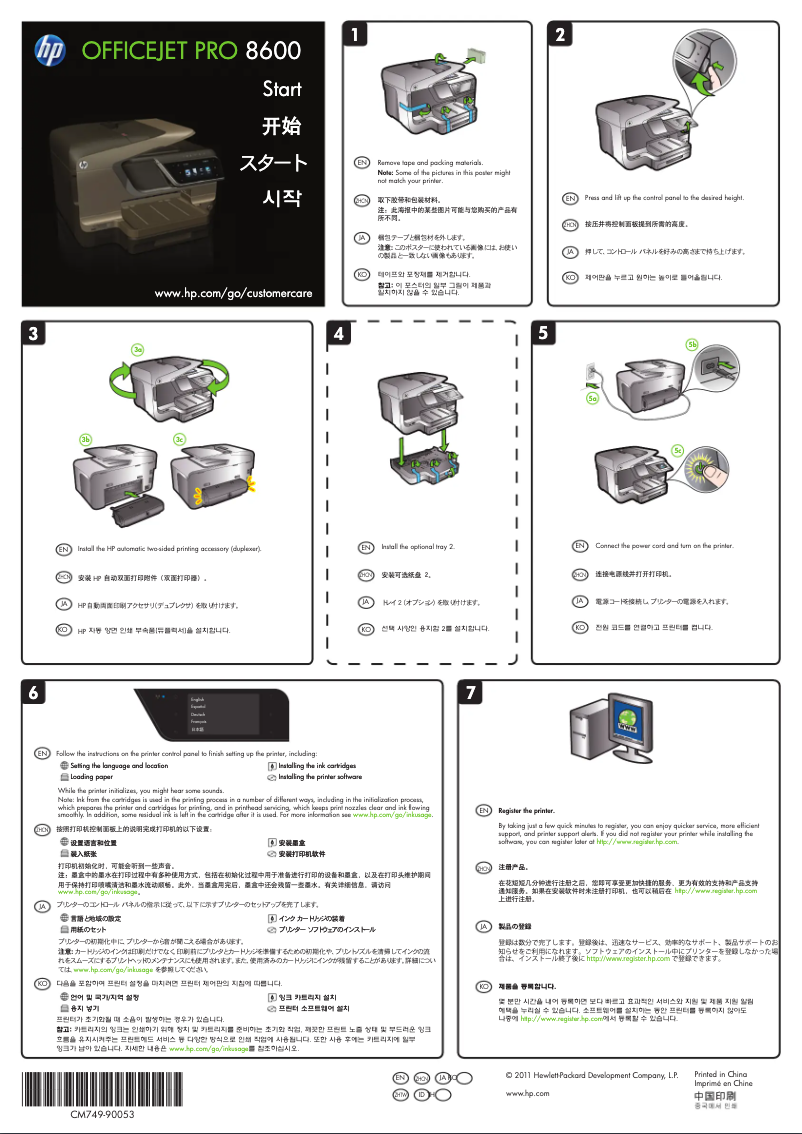
The provided documentation is comprehensive with a user manual and a quick start guide, thus facilitating support for users.
Advantages
Exceptional professional print quality.
Multifunction printer: printing, photocopying, scanning.
Wi-Fi connectivity for various devices.
Energy savings and reduced costs.
Easy installation and use.
Disadvantages
High cost of ink cartridges.
Bulky size for small spaces.
Reported Wi-Fi connectivity issues.
Slower printing time than other models.
Uneven color print quality.
Technical Specifications Officejet Pro 8600
General Information
-
ModelOFFICEJET PRO 8600
-
Brand
-
Category
-
Type
-
SKU87720
-
MPN87720
Frequently Asked Questions
What is the recommended method for removing jammed paper from the printer?
Why is my printer refusing to accept original cartridges?
What are the possible reasons for poor print quality?
How does a laser printer differ from an inkjet printer?
Why is my inkjet printer leaving black streaks on prints?
What does the term DPI mean?
How can I resolve a paper jam on my HP Officejet Pro 8600?
Why is the print quality of my HP Officejet Pro 8600 unsatisfactory?
What is the procedure to connect my HP Officejet Pro 8600 to a wireless network?
What should I do if my HP Officejet Pro 8600 does not turn on?
What is the procedure for replacing the ink cartridges in my HP Officejet Pro 8600?
Is the manual for the HP Officejet Pro 8600 available in French?
Similar products


More product categories from brand HP
Computers and accessories HP
Other HP
Phones HP
Audio HP
Interior HP
Software HP
More product types from brand HP


Presentation of product Officejet Pro 8600 specifications from brand HP
General Information
The HP Officejet Pro 8600 printer is a flagship model from the HP brand, known for its commitment to quality and innovation in the office equipment sector. This model is designed to deliver exceptional performance and an optimized user experience. The EAN code 886111607341 uniquely identifies this product within the distribution network.
Advantages
This printer stands out for its professional print quality, ideal for producing high-quality documents, thanks to its advanced printing technology. As a multifunction device, the HP Officejet Pro 8600 allows for printing, copying, scanning, and faxing, making it a comprehensive tool for offices and work environments.
The extensive connectivity is also a major asset, with options like Wi-Fi, facilitating printing from various devices, including computers, tablets, and smartphones. Additionally, this printer is designed to be energy-efficient, helping to reduce electricity costs while ensuring reliable performance. The setup is simplified with accessible installation guides and a user manual, making it easy to use even for less experienced users.
Disadvantages
However, it is important to note some disadvantages. The cost of ink cartridges can be high, which increases long-term expenses. Furthermore, the size of the printer may be considered bulky for limited workspaces. Some users have also reported network connectivity issues, particularly regarding Wi-Fi. Moreover, the printing time may be longer than that of other similar models, and the print quality of certain color images may vary, especially on standard paper.


