

Manuals of product FS-720
Editorial note
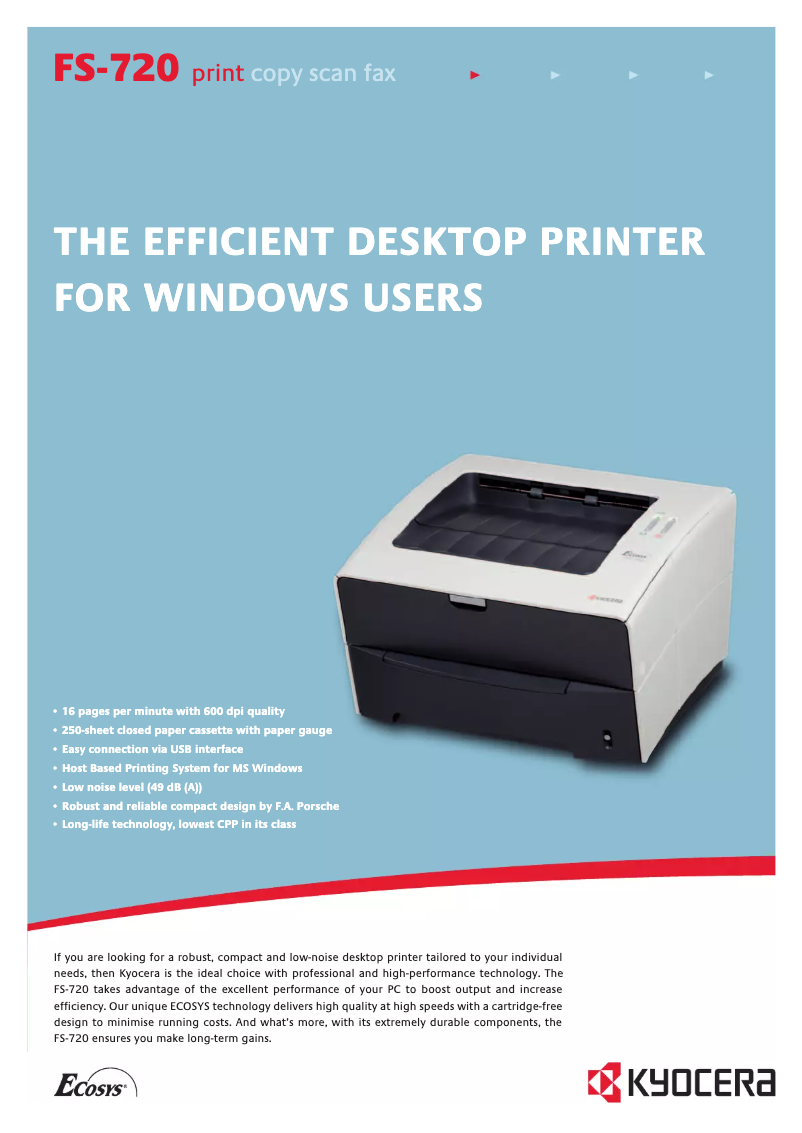
The Kyocera FS-720 printer stands out for its solid performance and laser printing technology, ensuring optimal quality for black and white documents. With a printing speed of 16 pages per minute, it is ideal for daily use and can handle a large volume of documents thanks to its maximum monthly duty cycle of 12,000 pages. Additionally, the optional duplex printing feature helps optimize paper usage, thereby contributing to reduced printing costs. However, the lack of support for color printing limits its use for documents requiring a richer visual presentation. Furthermore, the internal memory of only 8 MB may hinder the processing of more complex printing tasks. Its weight of 9,200 g can also pose challenges in terms of mobility, especially in office environments where flexibility is essential. Finally, although the energy consumption in economy and standby mode is low, the noise level of 49 dB during printing can be disruptive in quiet workspaces. Overall, the Kyocera FS-720 is a wise choice for those seeking a reliable and efficient printer for black and white prints, but users with more diverse or intensive printing needs may find some of its features limited.Score details
User experience
The user experience is generally satisfactory, although the lack of color printing limits its use for certain documents.
Performance
The performance is adequate for daily use, but the 8 MB internal memory may hinder the processing of more complex tasks.
Battery life
The low energy consumption in economy mode and standby contributes to better energy efficiency, reducing the ecological footprint.
Design
The weight of 9200 g makes handling difficult, which can be a disadvantage in office environments where flexibility is required.
Features
The printing speed of 16 ppm and the optional duplex printing feature are notable assets, but the 250-sheet paper capacity may be insufficient for heavy users.
Usability
Despite a functional interface, the noise level of 49 dB during printing can be disruptive in quiet work environments.
Advantages
16 ppm for fast printing
Laser quality for precise documents
Double-sided printing for paper savings
250-sheet capacity, heavy use
Energy saving in sleep mode
Disadvantages
No color printing available
Internal memory limited to 8 MB
Heavy weight, difficult to move
Insufficient power capacity
High noise level at 49 dB
Technical Specifications FS-720
General Information
-
ModelFS-720
-
Brand
-
Category
-
Type
-
SKU859922
-
MPN859922
Print speed
-
Print speed (black, normal quality, A4/US Letter)16 ppm
-
ColorNo
-
Printing technologyLaser
Other features
-
I/O Ports1 x USB 2.0
-
Standard average formatsA4, B5, A5, Letter, Legal, Custom
-
Double-sided printing optionsManual duplex supported from printer driver
-
Power requirementsAC 220/240 V 50/60 Hz
-
Electricity consumption in operation302 W
Paper management
-
Maximum print format210 x 297 mm
-
Maximum ISO A series paper sizeA4
Representation / realization
-
Internal memory8 MB
-
Processor model32 Bit RISC CPU
-
Sound power level (standby)28 dB
-
Sound pressure level (impression)49 dB
-
Integrated into the processorYes
Input and output capacity
-
Total power capacity250 sheets
-
Total output capacity100 sheets
Weight and dimensions
-
Dimensions (LxWxH)380 x 390 x 245 mm
-
Weight9200 g
Features
-
Service cycle (Maximum)12000 pages per month
Power
-
Energy consumption (eco mode)4.2 W
-
Energy consumption (standby mode)5 W
Frequently Asked Questions
What is the weight of the Kyocera FS-720 printer?
What is the recommended method for removing paper jammed in the printer?
Why does my printer not recognize original cartridges?
What could be the reasons for poor print quality?
How does a laser printer differ from an inkjet printer?
Why does my inkjet printer leave black streaks on my prints?
What does the acronym DPI mean?
Is the manual for the Kyocera FS-720 printer available in French?
Similar products


More product categories from brand Kyocera
Phones Kyocera
Other Kyocera
More product types from brand Kyocera


Presentation of product FS-720 specifications from brand Kyocera
General Information
The model Kyocera FS-720, manufactured by the brand Kyocera, is known for its robustness and innovation in the printing device sector. Designed to provide reliable performance, this device ensures a pleasant user experience, tailored to various printing needs.
Print Speed
With a print speed of 16 pages per minute in black and white in A4/US Letter format, the Kyocera FS-720 is particularly efficient for daily tasks. Although it does not support color printing, its laser printing technology ensures results of exceptional clarity.
Other Features
This model is equipped with a USB 2.0 port, providing convenient connectivity. It supports a variety of formats, including A4, B5, A5, Letter, Legal, and custom, making it versatile for different applications. Additionally, the duplex printing option helps save paper while producing neat documents. The power requirements are AC 220/240 V at 50/60 Hz, and its power consumption during operation is 302 W.
Paper Management
The Kyocera FS-720 allows for maximum printing in 210 x 297 mm format, ideal for standard-sized documents. It is also compatible with A4 ISO sheets, ensuring smooth integration into office environments.
Performance / Execution
Equipped with an internal memory of 8 MB, this device can efficiently handle the data and applications necessary for smooth printing. It operates with a 32 Bit RISC CPU, providing optimal performance. In standby mode, it emits a noise level of 28 dB, while in printing mode, this level rises to 49 dB, a detail to consider in noise-sensitive environments. The processing integrated into the CPU ensures increased efficiency.
Input and Output Capacity
The feeding capacity of the Kyocera FS-720 is 250 sheets, suitable for standard use, while its output capacity is 100 sheets, ensuring effective print management.
Weight and Dimensions
With dimensions of 380 x 390 x 245 mm, the printer easily fits into various workspaces. Its weight of 9200 g ensures stability during use, although it may pose challenges in terms of mobility.
Specifications
The maximum duty cycle of the Kyocera FS-720 is 12,000 pages per month, making it a wise choice for users with frequent printing needs.
Power
In economy mode, the power consumption is only 4.2 W, while in standby, it is 5 W. These features contribute to significant energy savings and a reduced ecological footprint.


