

Manual of product C9800HDN
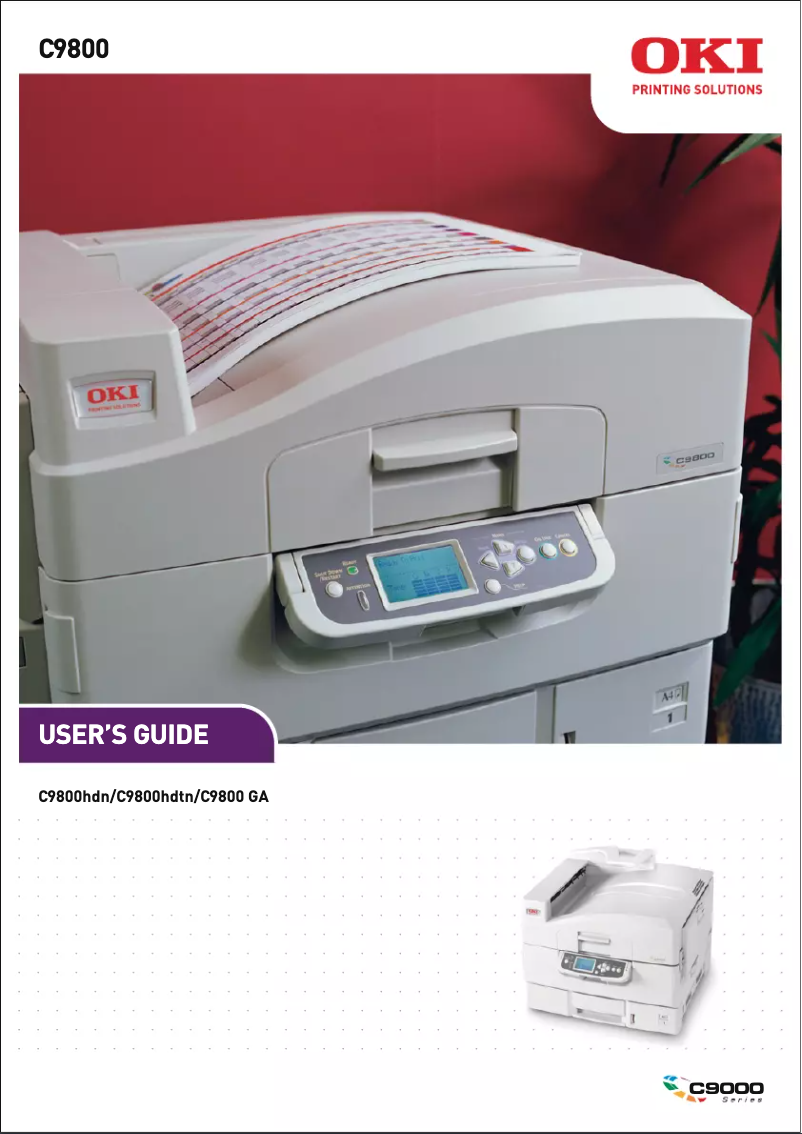
Editorial note
The OKI C9800HDN printer stands out for its impressive performance, offering a maximum resolution of 1200 x 1200 DPI that ensures prints of exceptional clarity, both for professional and personal use. Its printing speed of 40 pages per minute in black and 36 pages per minute in color allows for efficient handling of large volumes of documents, which is a major asset for heavy users. Additionally, the built-in duplex printing feature optimizes resource use and helps reduce paper waste. However, some aspects are worth noting. The weight of 69 kg makes installation difficult, especially in tight spaces. Furthermore, the warm-up time of 110 seconds can be a drawback for those seeking quick prints. The power consumption of 750 W during operation could lead to significant electricity costs in the long run, which might impact the value for money, despite the advanced features offered. Finally, the limited compatibility with certain recent operating systems could pose problems for users of more modern versions than Windows 7. In terms of user experience, the intuitive interface and practical features, such as enhanced network connectivity thanks to support for standard protocols, contribute to a pleasant use. However, the noise level of 54 dB during printing may be perceived as bothersome in quiet work environments. Overall, the OKI C9800HDN is a robust and high-performing printer, ideal for work environments requiring high-quality printing, but it also has drawbacks to consider for optimal integration into your workspace.Score details
User experience
The user experience is overall positive thanks to an intuitive interface and features such as integrated duplex printing that facilitate use.
Performance
The performance is solid, with a printing speed of 40 ppm in black and 36 ppm in color, well-suited for intensive professional use.
Battery life
Although the power consumption of 750 W in operation is high, the energy-saving feature helps reduce consumption.
Design
The weight of 69 kg can make installation difficult, especially in tight spaces, which affects the maneuverability of the device.
Value for money
With high-quality printing and advanced features, the product offers good value for money, although significant energy costs may arise.
Support
Limited compatibility with certain recent operating systems may pose problems for users using versions newer than Windows 7.
Usability
The maximum input capacity of 760 sheets and easy network connectivity are assets, but the 110-second warm-up time can be a drawback.
Robustness
The ENERGY STAR certification ensures energy efficiency, but the noise level of 54 dB during printing can be disruptive in quiet work environments.
Advantages
High-quality printing up to 1200 x 1200 DPI
Print speed of 40 ppm black
Built-in duplex printing
Input capacity of 760 sheets
Easy and standardized network connectivity
ENERGY STAR certified for energy efficiency
Disadvantages
High weight, difficult installation
Long preheating of 110 seconds
High power consumption of 750 W
Limited compatibility with recent systems
Annoying noise level of 54 dB
Technical Specifications C9800HDN
General Information
-
ModelC9800HDN
-
Brand
-
Category
-
Type
-
SKU1370418
-
MPN1370418
Print speed
-
Double-sided printingYes
-
Maximum resolution1200 x 1200 DPI
-
Print speed (black, normal quality, A4/US Letter)40 ppm
-
Preheating time110 s
-
Print speed (color, normal quality, A4/US Letter)36 ppm
-
Double-sided printingYes
Representation / realization
-
Processor modelTM5800-1000
-
Processor frequency1024 MHz
-
Internal memory1024 MB
-
Flash memory4 MB
-
Sound emission in energy-saving mode40 dB
-
Sound pressure level (impression)54 dB
-
Sound emission in energy-saving mode40 dB
-
Internal storage capacity20 GB
-
Integrated into the processorYes
-
Storage mediaHDD
Input and output capacity
-
Maximum input capacity760 sheets
-
Total power capacity530 sheets
-
Input capacity of multi-purpose trays230 sheets
-
Multifunctional trayYes
Other features
-
Standard input paper trays1
-
Standard average formats12" x 18"
-
Network features10/100 Base TX Ethernet
-
Compatible operating systemsWindows XP Professional, XP Home,
-
Emulations2003 Server; Windows 98, 98 SE, ME, NT 4.0 Workstation, NT 4.0 Server (SP6), 2000 Workstation (SP3), 2000 Professional (SP3), 2000 Server (SP3), 2000 Advanced Server (SP3); Mac OS 9.2, Mac OS 10.2.4 - 10.3.8
-
Included fontsPCL 5c, PCL 6, Adobe PostScript 3
-
Electricity consumption in operationYes
-
Power requirements750 W
-
230V
Paper management
-
ISO, Format Series A (A0...A9)A3
-
ISO, Formats Series-B (B0...B9)A4
-
Envelope sizesA5
-
Weight/Grammage of the support, bin 1A6
-
Weight of the multifunctional tray supportB5
-
Support weight supported in duplex modeC5
-
Non-ISO print support sizesDL
-
Maximum ISO A series paper size64 - 216 gsm
-
64 - 270 g/m²
-
75 - 120 g/m²
-
Executive (184 x 267mm), index card, Letter (media size), Legal (media size)
-
A3
Network
-
Ready-to-use networkYes
-
Support for network protocols (IPv4)TCP/IP, Netware & Ethertalk
Weight and dimensions
-
Dimensions (LxWxH)655 x 620 x 462 mm
-
Weight69000 g
Features
-
Service cycle (Maximum)150000 pages per month
-
Printer fontsBarcode, Bitmap, PCL, PostScript, TrueType
-
PostScript® Fonts136
-
PCL® Fonts86
-
Number of bitmap fonts1
-
Bitmap fontsOCR-A, OCR-B
-
Number of True Type fonts10
Sustainability
-
Sustainability certificatesENERGY STAR
Power
-
Energy consumption (eco mode)45 W
Frequently Asked Questions
What is the weight of the OKI C9800HDN printer?
What is the recommended method for removing paper jammed in the printer?
Why is my printer not recognizing the original cartridges?
What could be the reasons for poor print quality?
What are the differences between a laser printer and an inkjet printer?
Why is my inkjet printer producing black lines?
What does the acronym DPI mean?
What is the memory capacity of the OKI C9800HDN?
Is the manual for the OKI C9800HDN available in French?
Similar products


More product categories from brand OKI
More product types from brand OKI


Presentation of product C9800HDN specifications from brand OKI
General Information
The model OKI C9800HDN, offered by the renowned brand OKI, embodies innovation and quality in the field of printing. This model, identified by the number 62423008, is designed to deliver remarkable performance and an optimal user experience.
Print Speed
This printer is capable of printing in color, thus meeting the aesthetic needs of users. It offers a maximum resolution of 1200 x 1200 DPI, ensuring prints of exceptional clarity, suitable for both professional needs and personal projects. In terms of speed, the OKI C9800HDN reaches a print speed of 40 pages per minute (ppm) in black and 36 ppm in color. The warm-up time is 110 seconds, which may be considered a drawback for users seeking instant prints. Additionally, the printer features a duplex printing function, allowing for optimized paper usage.
Representation / Execution
The integrated processor, model TM5800-1000, operates at a frequency of 1024 MHz, ensuring rapid task execution. With an internal memory of 1024 Mo and a flash memory of 4 Mo, the OKI C9800HDN allows for efficient data management. Its noise level in standby is 40 dB, ensuring discreet use, while the sound pressure level during printing is 54 dB, which may pose a problem in a quiet environment. The internal storage capacity is 20 Go, facilitating access to files.
Input and Output Capacity
This printer is equipped with a maximum input capacity of 760 sheets, which is ideal for intensive printing tasks. The total feed capacity is 530 sheets, while the multi-purpose trays can hold up to 230 sheets. Additionally, a multi-function tray is included to meet various printing needs.
Other Features
The OKI C9800HDN is equipped with a standard paper tray and a standard medium format of 12" x 18", suitable for a variety of applications. Its connectivity is facilitated by 10/100 Base TX Ethernet network features, ensuring a fast connection. It is compatible with operating systems such as Windows XP, Vista, and 7. The printer supports multiple emulation modes, including PCL 5c, PCL 6, and Adobe PostScript 3. The power consumption during operation is 750 W, while it requires a power supply of 230V.
Paper Management
It supports various paper formats, including series A (A3, A4, A5, A6) and B (B5), as well as envelope sizes like C5 and DL. The weight/grammage of the media ranges from 64 to 216 gsm, ensuring compatibility with different types of paper. The maximum paper size for series A ISO is A3, thus ensuring flexibility of use.
Network
The network of the OKI C9800HDN is preconfigured for immediate use. It supports multiple network protocols, such as TCP/IP, Netware, and Ethertalk, ensuring efficient print management.
Weight and Dimensions
With dimensions of 655 x 620 x 462 mm and a weight of 69 kg, this model is designed to fit into various work environments, although its weight may complicate installation.
Features
The maximum service cycle is 150,000 pages per month, suitable for intensive users. The printer supports a variety of fonts, including Barcode, Bitmap, PCL, PostScript, and TrueType fonts, offering flexibility for printing projects. Furthermore, it is certified ENERGY STAR, attesting to its energy efficiency and environmental compliance.
Durability
This printer meets high standards for energy efficiency, thus contributing to environmental protection.
Power
In economy mode, its power consumption is reduced to 45 W, allowing for lower operating costs while maintaining adequate performance.


