

Manual of product Pro7411WT
Editorial note
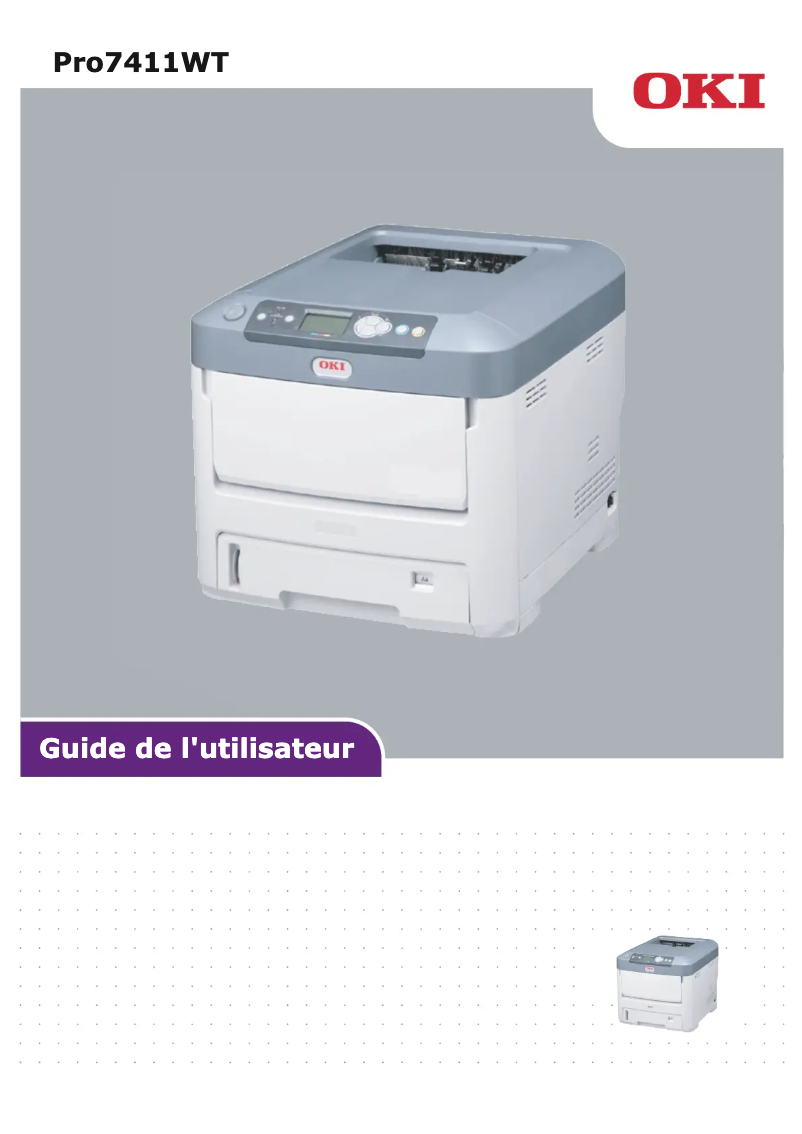
The OKI Pro7411WT printer stands out for its remarkable performance, offering a print speed of 36 pages per minute in black and 34 pages per minute in color. This speed makes it an ideal choice for professional environments where efficiency is essential. Additionally, its maximum resolution of 600 x 1200 DPI ensures prints of exceptional quality, thus meeting the varied needs of users. However, some drawbacks deserve to be highlighted. The lack of Wi-Fi connectivity limits usage flexibility, making it difficult to print wirelessly from mobile devices. Furthermore, its maximum consumption of 1300 W could lead to higher electricity costs for regular use. Its weight of 28 kg may also pose challenges during installation and handling in tight spaces. Finally, the warm-up time of 60 seconds may seem long for those who need quick prints, and paper management is limited to a maximum of 1690 sheets, which may not be sufficient for offices with very high printing needs. In terms of design, the OKI Pro7411WT features a modern aesthetic, although its weight may pose a challenge during installation. The value for money is considered good, particularly due to its print quality and high feed capacity. Users will also appreciate the adequate support provided, with a comprehensive user manual that facilitates the installation and use of the printer. Overall, the OKI Pro7411WT is a high-performing printer that will be perfectly suited for users seeking exceptional print quality and high speed, but it is important to consider its limitations in terms of connectivity and paper management.Score details
User experience
The user experience is generally positive, with an intuitive interface and well-thought-out features, but the lack of Wi-Fi connectivity limits usage flexibility.
Performance
The performance is excellent, with a printing speed of 36 ppm in black and 34 ppm in color, ideal for professional use.
Design
The design is modern, but its weight of 28 kg can make installation and handling difficult.
Value for money
The value for money is good, considering the exceptional print quality and high paper capacity, but the power consumption of 1300 W can increase costs.
Features
The printer's features are solid, but the 60-second warm-up time and the limitation of paper handling to 1690 sheets can be drawbacks for some users.
Support
The support is adequate with a comprehensive 86-page user manual.
Documentation
The documentation is clear and informative, making the installation and use of the printer easier.
Advantages
Fast printing: 36 ppm black, 34 ppm color
Optimal resolution: 600 x 1200 DPI
Built-in Ethernet/LAN connectivity
Duty cycle: 60,000 pages/month
ENERGY STAR certified for sustainability
Disadvantages
No Wi-Fi connectivity
High power consumption
Weight of 28 kg
Long preheating time
Limited paper capacity
Technical Specifications Pro7411WT
General Information
-
ModelPRO7411WT
-
Brand
-
Category
-
Type
-
SKU1514631
-
MPN1514631
Print speed
-
Double-sided printing-
-
ColorYes
-
Maximum resolution600 x 1200 DPI
-
Printing technologyLED
-
Preheating time60 s
-
Print speed (black, normal quality, A4/US Letter)36 ppm
-
Print speed (color, normal quality, A4/US Letter)34 ppm
-
Copy time for the first page (Black, normal)8 s
-
Copy time for the first page (color, normal)9 s
Features
-
Number of print cartridges4
-
Languages of the page descriptionPostScript 3
-
Service cycle (Maximum)60000 pages per month
-
Service cycle (recommended)0 - 6000 pages per month
-
Printing colorsBlack, Cyan, Magenta, White, Yellow
Network
-
Ready-to-use network-
-
Mobile printing technologies-
-
Ethernet/LANYes
-
WifiNo
-
Management protocolsTCP/IP, EtherTalk, IPX/SPX
-
Security-supported algorithmIPSEC, SMTP-AUTH, SNMP, SSL/TLS
Connectivity
-
Standard interfacesRJ-45, USB 2.0
-
Quantity of USB 2.0 Ports1
Minimum system requirements
-
Support for the Windows operating systemWindows 10 Education
-
Support for the server operating systemWindows 10 Education x64
-
Support for the Mac operating systemWindows 10 Enterprise
-
Windows 10 Enterprise x64
-
Windows 10 Home
-
Windows 10 Home x64
-
Windows 10 Pro
-
Windows 10 Pro x64
-
Windows 2000
-
Windows 7 Enterprise
-
Windows 7 Enterprise x64
-
Windows 7 Home Basic
-
Windows 7 Home Basic x64
-
Windows 7 Home Premium
-
Windows 7 Home Premium x64
-
Windows 7 Professional
-
Windows 7 Professional x64
-
Windows 7 Starter
-
Windows 7 Starter x64
-
Windows 7 Ultimate
-
Windows 7 Ultimate x64
-
Windows 8
-
Windows 8 Enterprise
-
Windows 8 Enterprise x64
-
Windows 8 Pro
-
Windows 8 Pro x64
-
Windows 8 x64
-
Windows Vista Business
-
Windows Vista Business x64
-
Windows Vista Enterprise
-
Windows Vista Enterprise x64
-
Windows Vista Home Basic
-
Windows Vista Home Basic x64
-
Windows Vista Home Premium
-
Windows Vista Home Premium x64
-
Windows Vista Ultimate
-
Windows Vista Ultimate x64
-
Windows XP Home
-
Windows XP Home x64
-
Windows XP Professional
-
Windows XP Professional x64
-
Windows Server 2003
-
Windows Server 2003 x64
-
Windows Server 2008
-
Windows Server 2008 R2
-
Windows Server 2008 x64
-
Mac OS X 10.10 Yosemite
-
Mac OS X 10.11 El Capitan
-
Mac OS X 10.3 Panther
-
Mac OS X 10.4 Tiger
-
Mac OS X 10.5 Leopard
-
Mac OS X 10.6 Snow Leopard
-
Mac OS X 10.7 Lion
-
Mac OS X 10.8 Mountain Lion
-
Mac OS X 10.9 Mavericks
Representation / realization
-
Internal memory256 MB
-
Maximum internal memory768 MB
-
Sound pressure level (impression)54 dB
-
Sound level, on hold37 dB
-
Integrated into the processorYes
-
Processor frequency533 MHz
Paper management
-
Maximum ISO A series paper sizeA4
-
ISO, Format Series A (A0...A9)A4, A5, A6
-
ISO, Formats Series-B (B0...B9)B5
-
Type of paper tray supportEnvelopes, Labels
-
Non-ISO print support sizesExecutive (184 x 267mm), index card, Letter (media size), Legal (media size)
-
Support width customization148 - 216 mm
-
Customization of support length210 - 389 mm
-
Weight of paper tray support64 - 220 g/m²
-
Weight of the multifunctional tray support64 - 250 g/m²
-
Envelope sizes9, 10, C5, DL, Monarch
Input and output capacity
-
Paper feed typePaper bin
-
Total power capacity530 sheets
-
Maximum number of feed bins3
-
Total number of power supply units1
-
Total power capacity530 sheets
-
Input capacity of multi-purpose trays100 sheets
-
Total output capacity350 sheets
-
Maximum input capacity1690 sheets
-
Multifunctional trayYes
Weight and dimensions
-
Width435 mm
-
Depth546 mm
-
Height389 mm
-
Weight28000 g
Environmental conditions
-
Operating temperature10 - 32 °C
-
Temperature out of operation0 - 43 °C
-
Operating relative humidity (H-H)20 - 80 %
-
Relative humidity rate (storage)10 - 90 %
Power
-
AC input voltage220 - 240 V
-
AC input frequency50 - 60 Hz
-
Consumption (max)1300 W
-
Average power consumption in Print mode600 W
-
Energy consumption (eco mode)15 W
Sustainability
-
Sustainability certificatesENERGY STAR
Design
-
CertificationEMC
-
Built-in screenCE
-
Product colorGS
-
CCC
-
Yes
-
White
Packaging contents
-
Cartridge(s) includedYes
-
Cables includedSector
Frequently Asked Questions
What is the weight of the OKI Pro7411WT?
What is the best method to remove a jammed paper from the printer?
Why does my printer not recognize the original cartridges?
Why is the quality of my prints poor?
What is the difference between a laser printer and an inkjet printer?
Why does my inkjet printer leave black streaks on prints?
What does the acronym DPI mean?
What are the certifications of the OKI Pro7411WT?
How many cartridges can be installed in the OKI Pro7411WT?
What is the height of the OKI Pro7411WT?
What is the width of the OKI Pro7411WT?
What is the depth of the OKI Pro7411WT?
Is the manual for the OKI Pro7411WT available in French?
Similar products


More product categories from brand OKI
More product types from brand OKI


Presentation of product Pro7411WT specifications from brand OKI
General Information
The OKI Pro7411WT is a printer from the OKI brand, known for its commitment to quality and innovation in the printing device sector. With the EAN code 5031713066538, this model offers advanced features to meet the varied needs of users.
Print Speed
This printer is capable of printing in color, offering an impressive maximum resolution of 600 x 1200 DPI, ensuring sharp and precise prints. Its print speed reaches 36 pages per minute (ppm) in black and 34 ppm in color, making this model particularly suitable for professional environments. Additionally, the first page output time is 8 seconds for black prints and 9 seconds for color prints, ensuring increased efficiency.
Features
The OKI Pro7411WT uses a 4-cartridge system, including various colors such as black, cyan, magenta, white, and yellow, ensuring optimal print quality. It is designed for a maximum service cycle of 60,000 pages per month, thus meeting the demands of intensive use. The recommended service cycle is 0 to 6,000 pages, allowing for extended durability of the device.
Network
This printer is equipped with Ethernet/LAN connectivity, facilitating integration into various work environments. However, it does not offer Wi-Fi connectivity, which may limit its wireless use. Mobile printing technologies are also available, allowing for quick prints from mobile devices. The TCP/IP management protocol, EtherTalk, and IPX/SPX ensure efficient management of network devices, while security algorithms such as IPSEC and SSL/TLS protect your data.
Connectivity
The OKI Pro7411WT features a standard interface and a USB 2.0 port, ensuring smooth and fast connectivity with other devices.
Minimum System Requirements
Compatible with many operating systems, including Windows (all recent versions) and Mac OS X (various versions), it ensures a seamless and uninterrupted user experience in different environments.
Representation / Performance
Equipped with 256 MB of internal memory, expandable up to 768 MB, the printer ensures efficient data management. Its sound pressure level is 54 dB during printing, allowing for relatively quiet operation, while it drops to 37 dB in standby mode.
Paper Management
This printer supports paper sizes up to A4, including standard formats such as A5 and B5. It can handle various types of media, including envelopes and labels, offering flexibility in printing options. Custom paper sizes are also possible, with widths from 148 to 216 mm and lengths from 210 to 389 mm.
Input and Output Capacity
The main paper tray of the OKI Pro7411WT can hold up to 530 sheets, with a total input capacity reaching 1690 sheets. The output capacity is 350 sheets, ensuring optimal performance in high-volume work environments.
Weight and Dimensions
With dimensions of 435 mm wide, 546 mm deep, and 389 mm high, and a weight of 28 kg, this printer is designed to fit efficiently into office spaces while remaining robust enough for intensive use.
Environmental Conditions
Operating within a temperature range of 10 to 32 °C, the OKI Pro7411WT is suitable for various work environments. Outside of this range, it can withstand temperatures up to 43 °C without damage. Its operating relative humidity ranges from 20 to 80%, ensuring stable operation under varied conditions.
Power
This printer operates with an AC input voltage of 220 to 240 V and a frequency of 50 to 60 Hz. Its maximum power consumption is 1300 W, with an average consumption in print mode of 600 W and a power-saving mode consumption of only 15 W.
Durability
Compliant with durability standards, the OKI Pro7411WT is ENERGY STAR certified, demonstrating its energy efficiency and environmental respect.
Design
This printer is certified EMC, CE, GS, and CCC, ensuring its compliance with safety and performance standards. Its built-in display facilitates use, while its white finish gives it a modern aesthetic.
Package Contents
The OKI Pro7411WT comes with included cartridges, allowing for immediate startup without additional purchases. A power cable is also provided to ensure optimal electrical connection.


