

Manuals of product TX-40DS400E

Editorial note
The Panasonic TX-40DS400E is a television that offers a pleasant viewing experience thanks to its Full HD image quality, with a resolution of 1920 x 1080 pixels and BMR 400 Hz interpolation technology, ideal for movies and sporting events. Its modern and sleek black design easily fits into various living environments, adding a nice aesthetic touch. However, the model has some limitations. The lack of Smart TV features limits access to streaming apps and online content, while the non-compatibility with 3D technology may disappoint some users. Additionally, the Full HD resolution may seem insufficient to those seeking a 4K experience. The limited number of HDMI ports (2) and the power of the built-in speakers (20 W) may require additional investments to optimize the multimedia experience. Overall, the user experience is positive thanks to intuitive management features, such as an electronic program guide, but the value for money is fair considering the mentioned drawbacks.Score details
User experience
The user experience is generally positive, thanks to intuitive management features like an electronic program guide and multilingual on-screen display, making it easier to use.
Performance
The Full HD image quality with a resolution of 1920 x 1080 pixels, combined with BMR 400 Hz interpolation technology, ensures a pleasant and smooth viewing experience, ideal for movies and sporting events.
Design
The modern and sleek black design easily fits into various living environments, adding a nice aesthetic touch.
Features
Although the product offers good features, it lacks Smart TV options and 3D compatibility, which limits access to streaming apps and three-dimensional content.
Value for money
The value for money is fair, but some drawbacks, such as the limited number of HDMI ports (2) and the audio power of the built-in speakers (20 W), may require additional investments for an optimal multimedia experience.
Advantages
Full HD image 1920 x 1080 pixels
Improved fluidity with BMR 400 Hz
Modern and sleek design in black
DLNA compatibility for easy sharing
Intuitive management with electronic guide
Disadvantages
No Smart TV features
Not 3D compatible
Full HD resolution only
Only 2 HDMI ports
Weak speaker sound
Technical Specifications TX-40DS400E
General Information
-
ModelTX-40DS400E
-
Brand
-
Category
-
Type
-
SKU864567
-
MPN864567
Screen
-
Screen size40 "
-
Screen resolution
-
Type HD1920 x 1080 pixels
-
Screen diagonal (cm)Full HD
-
Interpolation movement technology100 cm
-
Screen brightnessBMR 400 Hz
-
Response time- cd/m²
-
Screen shape- ms
-
Supported graphic resolutionsFlat
-
Supported video modes1920 x 1080 (HD 1080)
-
Image format1080p
-
16:9
Other features
-
3D CompatibilityNo
-
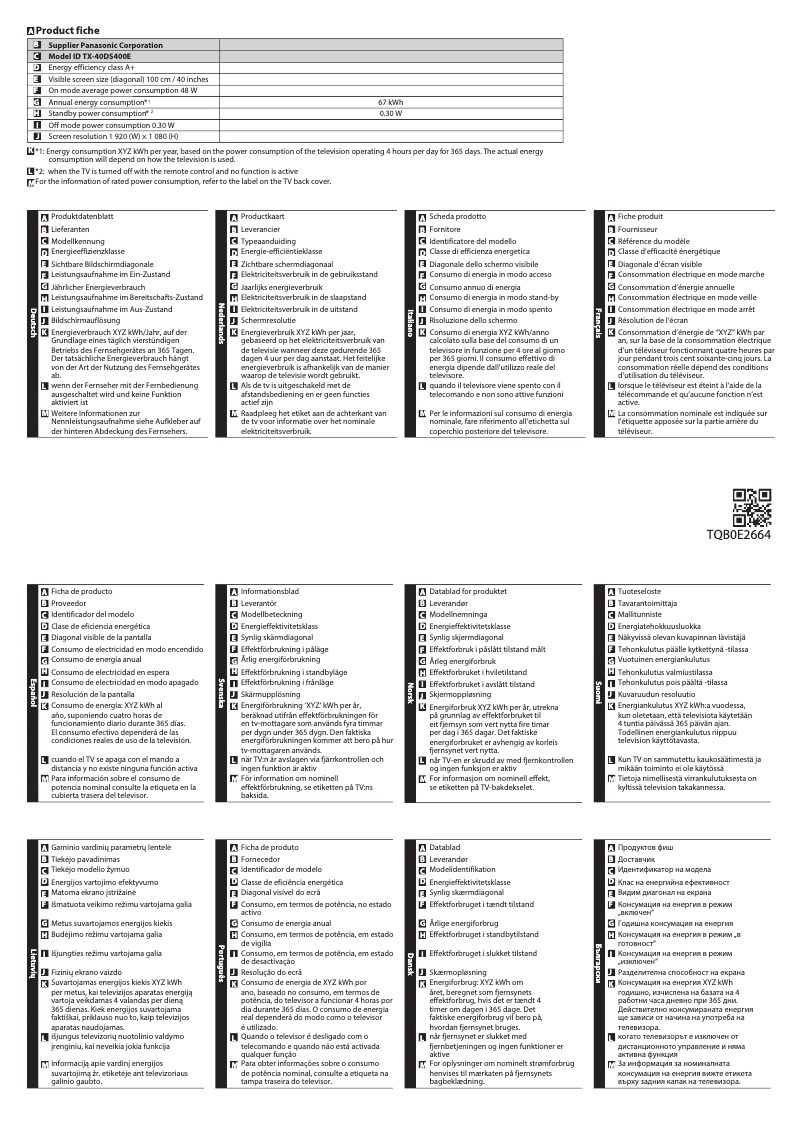
Energy efficiency class (old)A+
-
Annual energy consumption67 kWh
-
Certified DLNA (Digital Living New-York Alliance)Yes
-
Certified DLNA (Digital Living New-York Alliance)Yes
-
Certified DLNA (Digital Living New-York Alliance)Yes
Design
-
Product colorBlack
-
Built-in power buttonYes
-
VESA standard200 x 200 mm
-
Built-in power buttonYes
Power
-
Typical electricity consumption48 W
-
Electricity consumption (stop)0.3 W
-
Electricity consumption (stop)0.3 W
-
AC input frequency50 - 60 Hz
-
AC input voltage100 - 240 V
Audio
-
Number of speakers2
-
Rated power of RMS20 W
-
Sound modesMusic, Speech, Standard
Connectivity
-
Quantity of HDMI ports2
-
DVI PortNo
-
Quantity of USB 2.0 Ports1
-
Common Interface Plus (Cl+)Yes
-
Quantity of USB 2.0 Ports1
-
Quantity of USB 2.0 Ports1
-
Common Interface Plus (Cl+)Yes
-
Number of USB 3.2 Gen 1 (3.1 Gen 1) type A ports0
-
DVI PortNo
-
Number of USB 3.2 Gen 1 (3.1 Gen 1) type A ports0
-
Quantity of USB 2.0 Ports1
-
Number of USB 3.2 Gen 1 (3.1 Gen 1) type A ports0
-
Common Interface Plus (CI+) Version1.3
Smart TV / smart TV
-
Smart TV-
-
Smart ModesCinema
-
Screen mirrorCustom
-
Screen mirrorDynamic
-
Screen mirrorNormal
-
True Cinema
-
Yes
-
Yes
-
Yes
Management features
-
On-Screen Display (OSD)Yes
-
On-Screen Display (OSD)Yes
-
Number of OSD languages27
-
Multilingual display on screenBUL, CRO, CZE, DAN, DEU, DUT, ENG, ESP, EST, FIN, FRE, GRE, HUN, ITA, LAT, LIT, MAC, NOR, POR, RUS, SER, SLV, SWE, TUR
Network
-
Ethernet/LANYes
-
Ethernet/LANYes
-
Ethernet/LANYes
Certificate
-
DLNA SpecificationDMP
-
DMR
-
DMS
-
DTCP-IP
-
RUI 2.0
Representation / realization
-
Supported video format3GPP
-
Supported audio formatsAVI
-
Supported image formatsFLV
-
Teletext FunctionM4V
-
TeletextMKV
-
MP4
-
TS
-
VOB
-
VRO
-
AAC
-
FLAC
-
MP3
-
WAV
-
WMA
-
JPG
-
Yes
-
1000 pages
TV Tuner
-
Analog signal format system-
-
Digital signal system formatDVB-C
-
Tuner typeDVB-T
-
DVB-T2
-
Analog and digital
Packaging contents
-
Remote control providedYes
Weight and dimensions
-
Device width (support included)902 mm
-
Depth (without support)88 mm
-
Height (without support)522 mm
-
Weight (without support)8000 g
-
Device width (support included)902 mm
-
Depth (support included)238 mm
-
Height (support included)569 mm
-
Weight (with support)8500 g
Packaging information
-
Package width983 mm
-
Package depth145 mm
-
Package height662 mm
-
Package weight11000 g
Frequently Asked Questions
What is the recommended viewing distance for my Panasonic television?
What should I do if my television is not receiving a signal?
What are the dimensions of my television screen?
What is HDMI?
Is it possible to connect devices from different brands via Bluetooth?
What is the screen size of the Panasonic TX-40DS400E?
What is the resolution of the screen of the Panasonic TX-40DS400E?
Why won't my Panasonic TX-40DS400E turn on?
Why can't I hear any sound from my television?
How do I connect external devices like a DVD player or gaming console to my Panasonic TX-40DS400E?
Why is the image on my television distorted or pixelated?
How do I adjust the screen size to match the content on my Panasonic TX-40DS400E?
Does the Panasonic TX-40DS400E support 3D?
What is the display resolution of the Panasonic TX-40DS400E?
Is it possible to mount the Panasonic TX-40DS400E on the wall?
What is the energy efficiency class of the Panasonic TX-40DS400E?
How many HDMI ports are available on the Panasonic TX-40DS400E?
Is the manual for the Panasonic TX-40DS400E available in French?
Similar products


More product categories from brand Panasonic
Home appliances Panasonic
Phones Panasonic
Audio Panasonic
Camera and photography Panasonic
Personal care Panasonic
Other Panasonic
Tools Panasonic
Interior Panasonic
More product types from brand Panasonic








Presentation of product TX-40DS400E specifications from brand Panasonic
General Information
The Panasonic TX-40DS400E is a television from the Panasonic brand, known for its commitment to quality and innovation in the home appliance sector. This model, identified by the EAN code 5025232839636, promises optimal performance for an enhanced user experience.
Screen
With a screen size of 40 inches (100 cm), the Panasonic TX-40DS400E offers a resolution of 1920 x 1080 pixels in Full HD, ensuring clear and immersive display quality. Its interpolation technology, BMR 400 Hz, enhances motion fluidity, particularly appreciated when streaming movies and sporting events. The screen shape is flat, and the aspect ratio is 16:9, ideal for multimedia content.
Other Features
This model does not support 3D, but it has an energy efficiency class of A+, indicating a good level of energy performance. Its annual energy consumption is 67 kWh. The Panasonic TX-40DS400E is equipped with built-in speakers for a convenient audio experience. Additionally, it is DLNA certified, facilitating connection with other multimedia devices.
Design
The television features a modern and elegant black finish that integrates harmoniously into various decors. It is compatible with VESA mounting (200 x 200 mm), allowing for easy wall mounting to optimize space. An on/off button is also present for simplified control.
Power
The typical power consumption of the Panasonic TX-40DS400E is 48 W, while its standby consumption is 0.3 W, helping to reduce energy costs. It operates on an AC input voltage of 100 to 240 V and a frequency of 50 to 60 Hz.
Audio
Equipped with 2 speakers, the television offers an RMS power of 20 W. It has several sound modes (Music, Speech, Standard) to adapt the audio experience according to the type of content being broadcast.
Connectivity
The Panasonic TX-40DS400E is equipped with 2 HDMI ports and an Ethernet LAN port for a stable connection. It also includes a SCART port and a headphone output for audio connection. However, it does not have a built-in PC connector (D-Sub) or DVI ports.
Smart TV
This model does not have Smart TV features, limiting access to streaming applications. However, it includes screen mirroring, allowing you to project your device's display onto the television. It is compatible with HbbTV, providing access to interactive services.
Management Features
The Panasonic TX-40DS400E comes with an electronic program guide and an intuitive on-screen display (OSD), supporting up to 27 languages for accessible use.
Network
The television is equipped with Wi-Fi functionality for effective wireless connection, as well as a smooth browsing option for a better user experience.
Certification
The model complies with DLNA specifications, ensuring optimal interoperability with other multimedia devices.
Representation / Realization
It supports various video formats such as MP4, AVI, and MKV, as well as audio formats like MP3 and WAV. The supported image format is JPG, and it is also equipped with a teletext function, allowing access to additional information.
TV Tuner
The Panasonic TX-40DS400E is compatible with digital signal systems DVB-C, DVB-T, and DVB-T2, and it has both analog and digital tuners, ensuring varied reception of channels.
Packaging Contents
The television comes with a remote control for easy operation.
Weight and Dimensions
The dimensions of the Panasonic TX-40DS400E are as follows: width of 902 mm, depth of 88 mm (without stand), and height of 522 mm. Its weight is 8000 g, making it easy to transport and install.
Packaging Information
The product package measures 983 mm in width, 145 mm in depth, and 662 mm in height, with a total weight of 11000 g, ensuring adequate protection during transport.


