

Manuals of product Phaser 6360

Editorial note
The Xerox Phaser 6360 is a printer that stands out for its exceptional print quality, thanks to its laser technology and a maximum resolution of 2400 x 600 DPI. This performance makes it ideal for both professional and personal documents. Additionally, its input and output capacity is impressive, with a maximum input capacity of 2350 sheets and a total output capacity of 250 sheets, allowing for efficient management of large print volumes. The printer also features duplex printing, which helps reduce paper costs. Its modern and compact design makes it easy to integrate into various workspaces. However, some drawbacks must be considered. The weight of 56.2 kg can complicate the movement and installation of the printer, potentially requiring the assistance of several people. The lack of Wi-Fi connectivity limits usage flexibility, as the device must be directly connected to a network via an Ethernet cable. Furthermore, the power consumption in print mode of 750 W can be high, leading to significant electricity costs for users with high print volumes. Finally, the warm-up time of 49 seconds can be a disadvantage for those seeking quick printing. Overall, the user experience is very satisfactory, but the weight and lack of Wi-Fi can pose installation and flexibility issues. Performance is good, although the warm-up time may frustrate some users. Energy efficiency is improved with a 22 W economy mode, but the high consumption in print mode can be a limiting factor. The modern and compact design is an asset, but it requires adequate storage space. Finally, the value for money is reasonable, even though the lack of wireless connectivity may restrict certain uses.Score details
User experience
The user experience is very satisfactory due to the exceptional print quality and the built-in duplex printing feature. However, the weight of the printer can make its installation complicated.
Performance
The performance is generally good with a maximum resolution of 2400 x 600 DPI, but the warm-up time of 49 seconds can be a drawback for those looking for quick printing.
Battery life
Energy efficiency is improved thanks to the 22 W economy mode, but the consumption in print mode of 750 W could lead to high electricity costs for heavy users.
Design
The design is modern and compact, making it easy to integrate into various workspaces. Nevertheless, its dimensions and weight may require significant storage space.
Value for money
The value for money is reasonable considering the features offered, although the lack of Wi-Fi connectivity limits usage flexibility.
Advantages
High-quality laser printing, 2400 x 600 DPI.
Input capacity of 2350 sheets, output 250 sheets.
Built-in duplex printing to save paper.
Compact design, easily fits into spaces.
22 W economy mode to reduce costs.
Disadvantages
Weight of 56.2 kg, difficult to move.
No Wi-Fi connectivity, wired connection required.
High power consumption: 750 W during printing.
Preheating time of 49 seconds.
Bulky paper tray of 2350 sheets.
Technical Specifications Phaser 6360
General Information
-
ModelPHASER 6360
-
Brand
-
Category
-
Type
-
SKU973942
-
MPN973942
Other features
-
Electricity consumption in operation750 W
-
Acoustic pressure emissions58 dB
-
Humidity out of operation15 - 85 %
-
Depth (max)698 mm
-
Depth (min)580 mm
-
Height (max)854 mm
-
Height (min)513 mm
-
Maximum width572 mm
-
Storage temperature32 - 95 °F
-
Package length933.449 mm
Power
-
Energy consumption (eco mode)22 W
-
Energy consumption (standby mode)105 W
-
AC input voltage220 V
-
AC input frequency50 - 60 Hz
-
Average power consumption in Print mode750 W
Input and output capacity
-
Total output capacity250 sheets
-
Maximum input capacity2350 sheets
-
Total power capacity1800 sheets
-
Input capacity of multi-purpose trays150 sheets
-
Multifunctional trayYes
Print speed
-
Printing technologyLaser
-
Double-sided printingYes
-
Maximum resolution2400 x 600 DPI
-
Double-sided printingYes
-
Print speed (black, draft quality, A4/US Letter)40 ppm
-
Print speed (black, draft quality, A4/US Letter)40 ppm
-
Preheating time49 s
Representation / realization
-
Processor frequency1024 MHz
-
Sound power level (standby)34.4 dB
-
Maximum internal memory1024 MB
-
Internal memory512 MB
-
Sound pressure level (impression)58 dB
Environmental conditions
-
Operating relative humidity (H-H)15 - 85 %
-
Operating temperature50 - 90 °F
-
Operating temperature10 - 32 °C
Features
-
Number of print cartridges-
-
Service cycle (Maximum)100,000 pages per month
-
Languages of the page descriptionPCL 5c, PostScript 3
Packaging information
-
Package weight83462.4 g
-
Package height1498.599 mm
-
Package width609.599 mm
Paper management
-
ISO, Format Series A (A0...A9)A4
-
Maximum print formatA5
-
Type of paper tray supportA6
-
Non-ISO print support sizes216 x 356 mm
-
JIS series B format (B0...B9)Envelopes, Labels, Plain paper
-
Weight of paper tray supportExecutive (184 x 267mm), Folio (media size), Letter (media size), Oficio (media size), Legal (media size)
-
Support width customizationB5
-
Customization of support length64 - 216 g/m²
-
Maximum ISO A series paper size89 - 216 mm
-
140 - 914 mm
-
A4
Network
-
Mobile printing technologies-
-
Ready-to-use networkYes
-
WifiNo
-
Ready-to-use networkYes
-
Management protocolsSNMPv3
-
Security-supported algorithm802.1x RADIUS
Connectivity
-
Standard interfacesEthernet, USB 2.0
-
Optional connectivityWireless LAN
Design
-
Product colorBlue, White
-
Certification
-
CE, EMC 89/336/EEC, FCC, Low Voltage 73/23/EEC, RoHS, 2002/95/EC
Sustainability
-
Sustainability certificatesENERGY STAR
Weight and dimensions
-
Width572 mm
-
Depth698 mm
-
Height854 mm
-
Weight56200 g
Frequently Asked Questions
What is the weight of the Xerox Phaser 6360?
What is the best method to remove jammed paper from the printer?
Why is my printer not recognizing the original cartridges?
What are the reasons if my prints are of poor quality?
What is the difference between a laser printer and an inkjet printer?
Why does my inkjet printer leave black streaks on my prints?
What does the acronym DPI mean?
What certifications does the Xerox Phaser 6360 have?
How many cartridges can be installed in the Xerox Phaser 6360?
What is the height of the Xerox Phaser 6360?
What is the width of the Xerox Phaser 6360?
What is the depth of the Xerox Phaser 6360?
Is the manual for the Xerox Phaser 6360 available in French?
Similar products


More product categories from brand Xerox
Other Xerox
More product types from brand Xerox


Presentation of product Phaser 6360 specifications from brand Xerox
General Information
The Xerox Phaser 6360 is a printer from the Xerox brand, known for its commitment to quality and innovation in the printing device sector. This model, referenced as Phaser 6360 | 6360V_DXM, is designed to provide optimal performance and an enhanced user experience. The EAN code 0095205427769 allows for unique identification of the product in the distribution system.
Other Features
The power consumption during use is 750 W, which allows for evaluating its energy efficiency. The acoustic pressure emissions are limited to 58 dB, ensuring relatively quiet operation. Designed to operate in humidity conditions ranging from 15 to 85 %, the printer adapts to different environments. Its maximum dimensions are 698 mm in depth, 854 mm in height, and 572 mm in width, while the recommended storage temperature is between 32 and 95 °F. The package length is 933.449 mm, facilitating transport and storage.
Power
In economy mode, the Xerox Phaser 6360 consumes only 22 W, allowing for energy savings. In standby mode, the consumption is 105 W. It requires an AC input voltage of 220 V and operates on a frequency of 50 to 60 Hz, ensuring compatibility with standard electrical systems.
Input and Output Capacity
This printer has an output capacity of 250 sheets and a maximum input capacity of 2350 sheets. This allows for efficient management of large print volumes. The multifunction tray can hold up to 150 sheets, providing flexibility in the types of documents printed.
Print Speed
Equipped with laser printing technology, the Xerox Phaser 6360 delivers exceptional print quality with a resolution of up to 2400 x 600 DPI. It prints in color and offers duplex printing functionality, which helps reduce paper consumption. The print speed is 40 ppm for black documents, both in normal and draft quality. The warm-up time is 49 seconds.
Representation / Performance
The printer's processor operates at a frequency of 1024 MHz, positively influencing its performance. In standby mode, the noise level is 34.4 dB, ensuring discreet use. Its internal memory of 512 MB can be expanded up to 1024 MB, allowing for smooth management of print tasks.
Environmental Conditions
The Xerox Phaser 6360 operates in relative humidity conditions of 15 to 85 % and in an ambient temperature of 10 to 90 °F.
Features
It is designed for a maximum usage cycle of 100000 pages per month, thus meeting the needs of heavy users. This model uses a single cartridge for consistent print quality and offers page description languages such as PCL 5c and PostScript 3.
Packaging Information
The total weight of the package is 83462.4 g, ensuring adequate protection during transport. The package dimensions are 1498.599 mm in height and 609.599 mm in width, facilitating its storage.
Paper Management
This printer supports various paper formats, including ISO A formats (A4, A5, A6) and non-ISO options for greater flexibility. The compatible paper weight ranges from 64 to 216 g/m², and customization of the paper width and length is possible, ranging from 89 to 216 mm for width and 140 to 914 mm for length.
Network
The Xerox Phaser 6360 is equipped with Ethernet/LAN connectivity but does not have Wi-Fi. It is ready for immediate network connection and supports the SNMPv3 protocol for efficient network device management.
Connectivity
Standard interfaces are present to ensure easy integration with various devices, and a wireless LAN option is available to expand connection possibilities.
Design
Its modern design features shades of blue and white, while its certification includes several safety standards, such as CE and RoHS, ensuring compliance.
Durability
Certified ENERGY STAR, the Xerox Phaser 6360 meets high standards for energy efficiency and environmental impact.
Weight and Dimensions
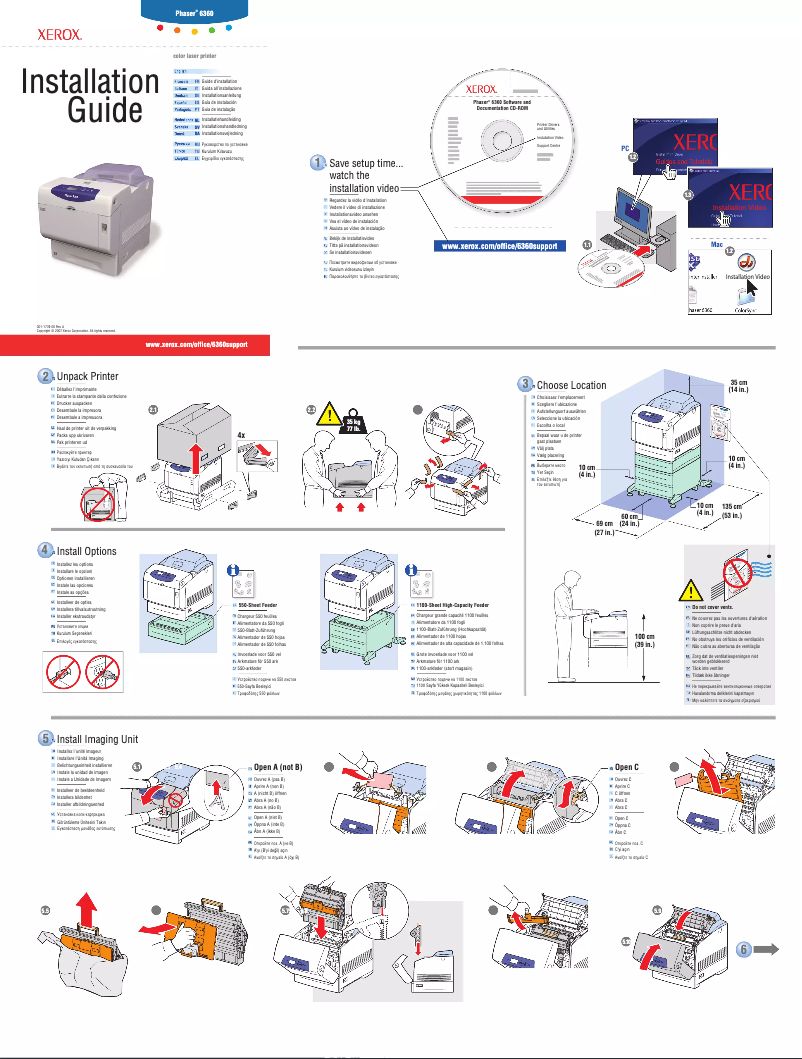
With a weight of 56.2 kg, it may require assistance for movement. Its dimensions are optimized for smooth integration into various workspaces: 572 mm in width, 698 mm in depth, and 854 mm in height.


