

Manuals of product WorkCentre 3025
Editorial note
The Xerox WorkCentre 3025 is a multifunction printer that stands out for its versatility, offering printing, scanning, and copying features from a single device. Its ease of use, enhanced by clear user manuals and an installation guide, makes it accessible even to novices. Additionally, its compact design allows for easy integration into limited workspaces while maintaining satisfactory performance. However, some drawbacks deserve to be highlighted. The printing speed is lower than that of newer models, which can be problematic in a busy office environment. Furthermore, the lack of advanced connectivity features, such as direct Wi-Fi or NFC, limits the flexibility of use with mobile devices. The high cost of ink cartridges can also represent a significant expense in the long term for regular users, just like the color print quality that may not meet expectations for high-quality graphic documents. Finally, the absence of automatic duplex printing may require manual handling, which can slow down the printing process. In summary, the Xerox WorkCentre 3025 offers an overall positive user experience and good value for money, but it is important to consider its limitations in terms of speed and connectivity before making a choice.Score details
User experience
The user experience is positive due to the ease of use and the manuals provided, making the device accessible even for novices.
Performance
The performance is generally good for printing, scanning, and copying, but the printing speed may be lower than that of newer models.
Design
The compact design of the printer allows for easy integration into small workspaces without compromising performance.
Features
The features offered are versatile, but some advanced connectivity options are lacking, which limits usage flexibility.
Value for money
The cost of ink cartridges can be high, increasing long-term expenses for regular users, which may harm the perception of value.
Advantages
All-in-one printing, scanning, and copying
High-quality prints
Compact design for small spaces
Easy to use for everyone
Flexible wireless connectivity
Disadvantages
Slow print speed for a busy office.
No direct Wi-Fi or NFC.
High cost of ink cartridges.
Disappointing color print quality.
No automatic duplex printing.
Technical Specifications WorkCentre 3025
General Information
-
ModelWORKCENTRE 3025
-
Brand
-
Category
-
Type
-
SKU1385765
-
MPN1385765
Frequently Asked Questions
What is the recommended method for removing jammed paper from the printer?
Why does my printer not recognize original cartridges?
What are the possible reasons for poor print quality?
What is the difference between a laser printer and an inkjet printer?
Why does my inkjet printer produce black marks on prints?
What does the acronym DPI mean?
Why is my printer not printing anything at all?
What is the procedure for scanning a document with my Xerox WorkCentre 3025?
What should I do if my prints have lines or smudges?
How do I set up wireless printing on my printer?
My printer frequently experiences paper jams, what can I do to prevent this?
Is the manual for the Xerox WorkCentre 3025 available in French?
Similar products


More product categories from brand Xerox
Other Xerox
More product types from brand Xerox


Presentation of product WorkCentre 3025 specifications from brand Xerox
General Information
The Xerox WorkCentre 3025 is a multifunction device from the brand Xerox, known for its innovation and reliability in the printing field. This model is designed to deliver high performance, combining printing, scanning, and copying in a single device, which enhances user efficiency.
Advantages
Function versatility: The WorkCentre 3025 allows users to perform multiple tasks from a single device, thus simplifying daily workflow.
Print quality: Thanks to advanced Xerox technology, this device delivers sharp, high-quality prints suitable for professional documents.
Compact design: Its reduced size makes it easy to integrate into limited workspaces while maintaining satisfactory performance.
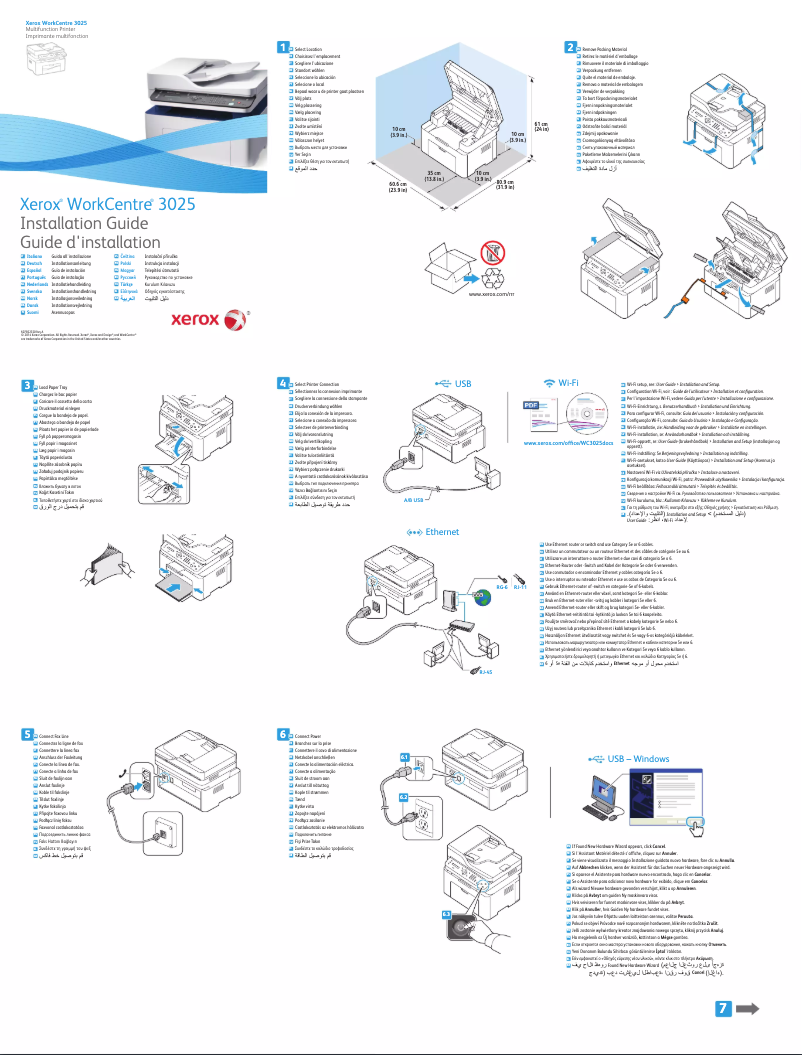
Ease of use: With user manuals and an installation guide included, setting up and using the printer is accessible, even for those unfamiliar with this type of device.
Varied connectivity: The WorkCentre 3025 offers flexible connectivity options, allowing for wireless printing and easy sharing among multiple users.
Disadvantages
Print speed: The print speed may be lower than that of newer models, which could slow down tasks in a busy professional environment.
Limited connectivity: The lack of advanced features such as direct Wi-Fi or NFC may restrict usability flexibility with mobile devices.
Consumable costs: The price of ink cartridges can be high, leading to additional expenses over the long term for regular users.
Color print quality: The quality of color prints may not always meet expectations for demanding graphic documents.
Duplex printing: The absence of automatic duplex printing requires manual handling, which can extend document processing time.


