

Manual of product QLn320
Editorial note
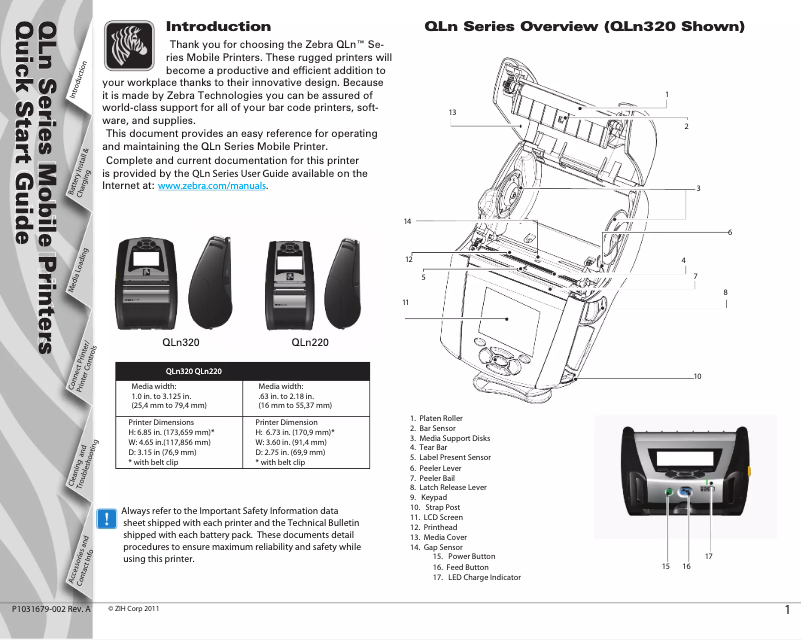
The Zebra QLn320 is a printer that stands out for its impressive printing speed of 100 mm/sec, which helps optimize work time. Its maximum resolution of 203 DPI ensures clear and precise prints, suitable for various professional uses. Additionally, the flexible connectivity with wired and wireless options facilitates its integration into different systems, making the user experience generally positive thanks to a user-friendly interface and simplified installation. However, it is worth noting some drawbacks. The 203 DPI resolution may not be sufficient for applications requiring very fine details, such as images or complex graphics. Furthermore, the weight of 720 g may pose a problem for prolonged mobile use, and the internal memory of 128 MB may limit file management in demanding work environments. The unique USB 2.0 interface also restricts simultaneous connections with multiple devices, which can be a disadvantage in certain contexts. Regarding battery life, the rechargeable NiMH technology allows for prolonged use, but may not be enough for workdays without access to a power source. Despite these limitations, the Zebra QLn320 offers good value for money, considering its performance and print quality, making it an interesting choice for professionals looking for an efficient and practical printing solution.Score details
User experience
The user experience is generally positive thanks to a user-friendly interface and easy installation, facilitated by the presence of included drivers.
Performance
The printing speed of 100 mm/sec and the resolution of 203 DPI ensure good performance, although the resolution may not be suitable for applications requiring high detail.
Battery life
The rechargeable NiMH battery technology offers a reasonable lifespan, but may not be sufficient for long workdays without recharging.
Design
The compact and lightweight design of the printer, with dimensions of 117 mm x 173 mm x 84 mm and a weight of 720 g, makes it easy to transport and integrate into different environments.
connectivity
The flexible connectivity with wired and wireless options is a plus, but the single USB interface may limit simultaneous connections with multiple devices.
Value for money
The Zebra QLn320 offers good value for money considering its printing performance and quality, despite some limitations in terms of internal memory.
Advantages
Fast printing at 100 mm/sec
Wired and wireless connectivity
High resolution of 203 DPI
Compact and lightweight, easy to carry
Rechargeable battery for extended use
Disadvantages
Limited print resolution of 203 DPI
Inconvenient weight of 720 g for transport
Insufficient internal memory of 128 MB
Restrictive single USB 2.0 connectivity
Limited battery life for long days
Technical Specifications QLn320
General Information
-
ModelQLN320
-
Brand
-
Category
-
Type
-
SKU231725
-
MPN231725
Print speed
-
Maximum resolution203 DPI
-
Print speed (metric measurement)100 mm/sec
-
Printing technologyDirect thermal
Design
-
ScreenLCD
-
Product colorBlack
-
White
Connectivity
-
Standard interfacesSerial
-
Connectivity technologyUSB 2.0
-
USB portEthernet
-
RS-232 portWired & Wireless
-
Optional connectivityYes
-
RS-232 port1
-
USB portEthernet
-
Wireless LAN
-
1
-
Yes
Representation / realization
-
Processor frequency400 MHz
-
Internal memory128 MB
-
Flash memory256 MB
-
Embedded barcodes1D, 2D, CODABAR (NW-7), EAN128, EAN13, EAN8, Interleaved 2/5, Matrix 2/5, PDF417, POSTNET, UPC-A, UPC-E
-
CertificationFCC 15, B, EN55022 B, EN60950, EN55024, VCCI B, EN55024, EN61000-4-2, EN61000-4-3, EN61000-4-4, EN61000-4-5, CE, UL, TUV, CSAMedia
Paper management
-
Max. diameter of the roll66 mm
-
Thickness of the support0.0584 - 0.1651 mm
-
Max. length of the support813 mm
-
Maximum output sheet to sheet32 "
Weight and dimensions
-
Width117 mm
-
Depth173 mm
-
Height84 mm
-
Weight720 g
Power
-
Battery technologyLithium-Ion (Li-Ion)
-
RechargeableYes
Environmental conditions
-
Relative humidity rate (storage)10 - 90 %
-
Operating temperature-4 - 122 °F
-
Operating temperature-20 - 50 °C
-
Relative humidity rate (storage)10 - 90 %
-
Temperature out of operation-25 - 65 °C
Packaging contents
-
Drivers includedYes
Frequently Asked Questions
What is the weight of the Zebra QLn320 printer?
How can I remove a jammed paper from the printer?
Why is my printer not recognizing the original cartridges?
Why is the quality of my prints poor?
How does a laser printer differ from an inkjet printer?
Why does my inkjet printer leave black streaks on my prints?
What does the abbreviation DPI mean?
What certifications does the Zebra QLn320 have?
What is the height of the Zebra QLn320 printer?
What is the width of the Zebra QLn320 printer?
What is the depth of the Zebra QLn320 printer?
Is the manual for the Zebra QLn320 printer available in French?
Similar products


More product categories from brand Zebra
More product types from brand Zebra





Presentation of product QLn320 specifications from brand Zebra
General Information
The Zebra QLn320 is a printer from the Zebra brand, known for its innovation and quality in the field of printing devices. This model, identified by the code QLn320 | QN3-AUGA0E00-00, is designed to deliver optimal performance and an enhanced user experience. The EAN code 5053785165032 allows for unique identification of this product within the distribution system.
Print Speed
With a maximum resolution of 203 DPI, the Zebra QLn320 ensures sharp and precise prints, suitable for a variety of professional and personal applications. Its print speed of 100 mm/sec contributes to increased efficiency during printing tasks. The direct thermal printing technology guarantees consistent quality and reliable results.
Design
Equipped with an LCD screen, the Zebra QLn320 offers a clear visual interface for intuitive use. Its modern design, with black and white finishes, gives it an elegant and professional look, facilitating its integration into various work environments.
Connectivity
This printer offers varied connectivity thanks to its standard interfaces, including both wired and wireless connections. The RS-232 interface allows for standardized serial communication, while a USB 2.0 port ensures fast connections. Additionally, optional connectivity includes Ethernet and Wireless LAN, thus expanding integration possibilities with different systems.
Representation / Performance
The Zebra QLn320 is equipped with a processor running at 400 MHz, ensuring rapid execution of instructions. Its internal memory of 128 Mo provides adequate space for data storage, while the flash memory of 256 Mo allows for easy management of various files. The printer supports multiple types of barcodes, including 1D and 2D, facilitating quick information reading. Furthermore, it holds several certifications, ensuring compliance with safety and performance standards.
Paper Management
The Zebra QLn320 is designed to accept rolls with a maximum diameter of 66 mm, with a media thickness ranging from 0.0584 to 0.1651 mm. Its maximum media length of 813 mm allows compatibility with different paper formats, while its maximum sheet-to-sheet output of 32" ensures efficient printing performance.
Weight and Dimensions
Measuring 117 mm in width, 173 mm in depth, and 84 mm in height, the Zebra QLn320 is designed to easily fit into various workspaces. Its weight of 720 g makes it light enough for easy handling while remaining robust.
Power
The hybrid nickel-metal (NiMH) battery technology of the Zebra QLn320 ensures durable and efficient performance for daily use. Additionally, this printer is rechargeable, allowing for prolonged use without the need to frequently replace batteries, making it both a practical and eco-friendly solution.
Environmental Conditions
The Zebra QLn320 operates effectively in relative humidity conditions of 10 to 90% and at temperatures ranging from -20 to 50 °C. Its ability to withstand storage temperatures between -25 and 65 °C ensures its durability in varied environments.
Packaging Contents
The Zebra QLn320 includes drivers for quick and easy installation, thus facilitating the printer's commissioning right out of the box.


