

Manual of product Maxify MB2000
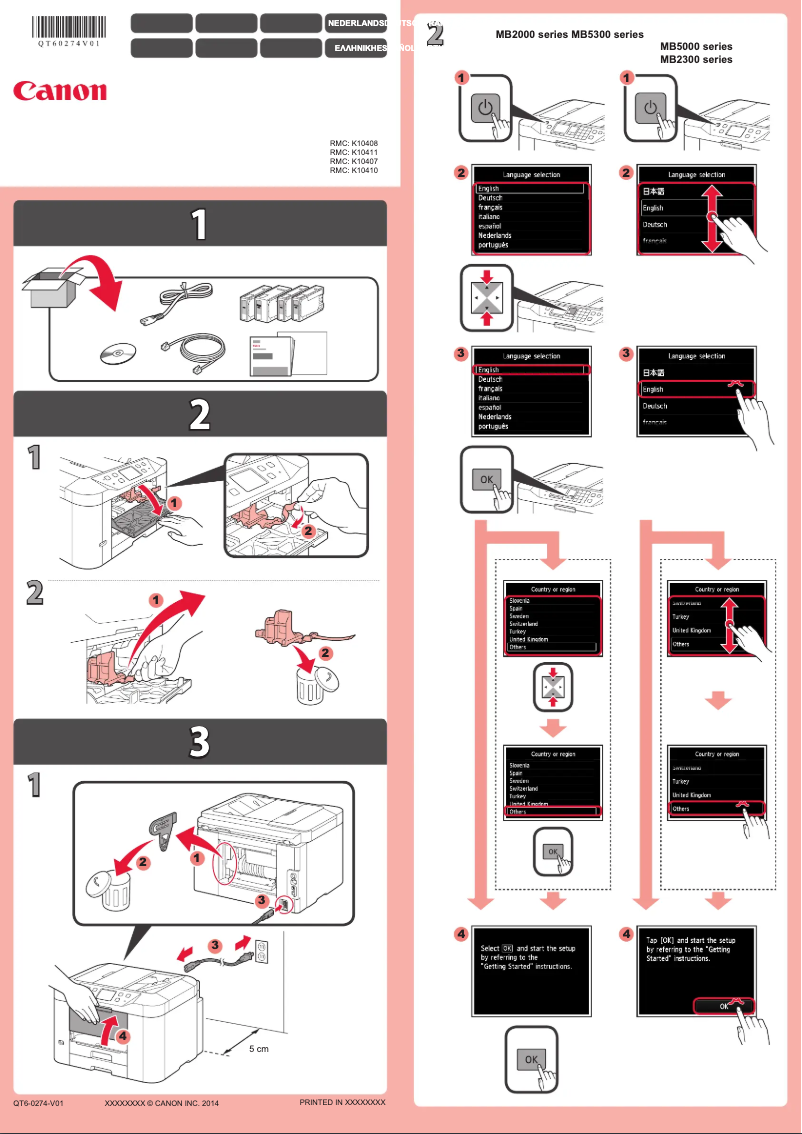
Editorial note
The Canon Maxify MB2000 stands out for its fast and high-quality printing performance, making this device particularly suitable for demanding work environments. Its ease of use is a major asset, thanks to a user-friendly interface and an accessible user manual, allowing even novices to use it without difficulty. This all-in-one model also offers appreciated versatility, integrating scanning and copying functions. However, some advanced features, such as wireless printing, may pose configuration issues, sometimes requiring technical expertise. Despite its many advantages, the printer has some drawbacks. Its bulkiness can be an obstacle in small workspaces, and the high cost of ink cartridges can lead to significant operating expenses in the long run. Additionally, while the printing speed is acceptable for home use, it may not satisfy users with high professional needs. Finally, the noise level during operation can be disturbing in a quiet environment. In summary, the Canon Maxify MB2000 is a solid choice for those looking for a reliable and high-performing printer, provided that its dimensions and the cost of consumables are taken into account.Score details
User experience
Ease of use is a real asset thanks to a user-friendly interface and an accessible user manual, making printing simple even for novices.
Performance
The Canon Maxify MB2000 offers fast and high-quality printing performance, well-suited for demanding work environments.
Features
The versatility of the printer, which also includes scanning and copying, is appreciated, but some advanced features can be difficult to set up.
Design
Although the design is functional, the bulk of the printer can be a drawback in restricted workspaces.
Value for money
The high cost of ink cartridges can lead to significant operating expenses, which may discourage some users.
Robustness
Canon is known for the reliability of its products, which contributes to the durability and trust in the printer.
Usability
Despite a user-friendly interface, some advanced features may require technical expertise for optimal use.
Support
Adequate support is available, but technical issues may require a wait time for solutions.
Advantages
Fast and high-quality printing performance
All-in-one printer for various uses
Intuitive interface and easy installation
Reliable and recognized brand in the industry
Reduced energy consumption and environmentally friendly
Disadvantages
Bulky for small spaces.
High cost of ink cartridges.
Complex setup of advanced features.
Insufficient printing speed for professionals.
Excessive noise during operation.
Technical Specifications Maxify MB2000
General Information
-
ModelMAXIFY MB2000
-
Brand
-
Category
-
Type
-
SKU859375
-
MPN859375
Frequently Asked Questions
What method is recommended to remove jammed paper from the printer?
Why does my printer not recognize original cartridges?
What could be the reasons for poor print quality?
What is the difference between a laser printer and an inkjet printer?
Why does my inkjet printer leave black streaks on prints?
What does the acronym DPI mean?
Is the manual for the Canon Maxify MB2000 available in French?
Similar products


More product categories from brand Canon
Computers and accessories Canon
Camera and photography Canon
Other Canon
Audio Canon
Software Canon
Interior Canon
More product types from brand Canon





Presentation of product Maxify MB2000 specifications from brand Canon
General Information
The Canon Maxify MB2000 is a multifunction printer from the Canon brand, known for its expertise and innovation in the field of printing equipment. This model stands out for its ability to deliver high-quality printing performance, suitable for work environments that require speed and efficiency.
Features and Performance
This all-in-one printer is designed to meet various office needs, including printing, scanning, and copying documents. Thanks to its intuitive interface, the Canon Maxify MB2000 is easy to install and use, even for less experienced users. Additionally, its energy efficiency helps reduce operating costs while minimizing its environmental impact.
Advantages
- Optimal performance: Fast and high-quality prints, ideal for demanding work environments.
- Versatility: Printing, scanning, and copying features combined in a single device.
- Ease of use: User-friendly interface and accessible user manual for simplified operation.
- Brand reliability: Canon guarantees a durable and trustworthy product thanks to its recognized expertise.
- Energy efficiency: Design aimed at reducing energy consumption, leading to savings.
Disadvantages
- Bulkiness: The printer can be relatively large, which may pose issues in small spaces.
- Cost of cartridges: Ink cartridges can be expensive, increasing long-term operating costs.
- Complexity of advanced features: Some options, such as wireless printing, may require specific technical skills for proper setup.
- Print speed: While satisfactory for home use, it may not be suitable for users with high printing volumes.
- Noise level: The operation of the printer may generate more noise than expected, which could be disruptive in quiet environments.


