

Manual of product 2256
Editorial note
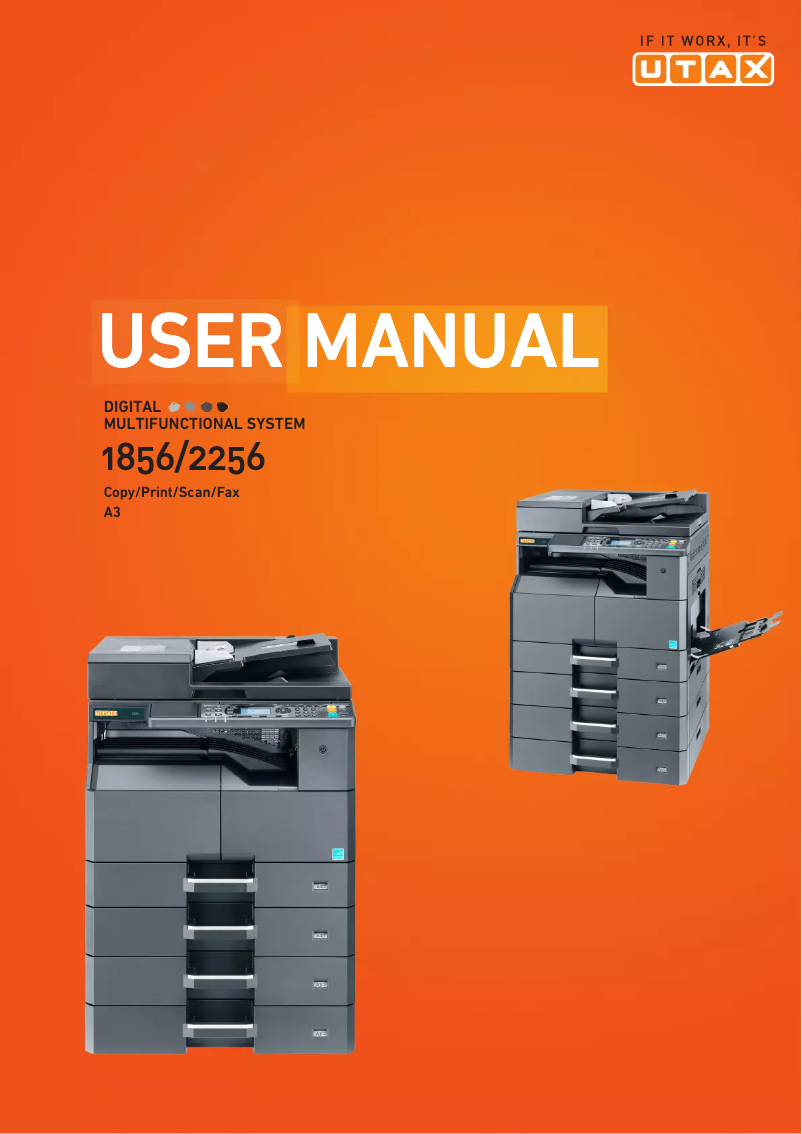
The Utax 2256 printer stands out for its solid performance and modern design, making it a wise choice for office environments. With a printing speed of 22 pages per minute in black and 10 pages in color, it allows for increased productivity, although this may not be sufficient for very high volume needs. The print quality is also remarkable, thanks to a maximum resolution of 600 x 600 DPI, ensuring clear and precise documents and images. Among its notable strengths is the color scanning feature, offering a speed of 14 pages per minute, as well as a paper capacity of 300 sheets, ideal for busy offices. Additionally, its built-in LCD screen makes it easy to use, making the user experience intuitive. However, some drawbacks deserve to be highlighted. The lack of Ethernet/LAN connectivity and Wi-Fi limits connection options, which can be a hindrance in a modern work environment where wireless connectivity is often preferred. Furthermore, the relatively high power consumption in operating mode (415 W) can lead to higher operating costs, especially for intensive use. The weight of 26 kg can also pose problems during installation or when rearranging the workspace, and the paper capacity may prove insufficient for large companies requiring continuous printing. In summary, the Utax 2256 is a high-performing and aesthetically pleasing device, but it could benefit from improvements in connectivity and energy efficiency to better meet the current demands of professional users.Score details
User experience
The user experience is enhanced by a modern and ergonomic design, as well as a built-in LCD screen that offers an intuitive interface for simplified use.
Performance
The printing speed is adequate at 22 ppm in black and 10 ppm in color, but may not be sufficient for very demanding work environments where high-volume production is necessary.
Battery life
The relatively high power consumption in operating mode (415 W) could lead to higher operating costs, especially for intensive use.
Design
The design is modern and ergonomic, contributing to a pleasant visual experience and intuitive use.
Value for money
Although the printer's features are solid, the lack of Ethernet/LAN and Wi-Fi connectivity limits connection options in a modern office environment.
Robustness
The product's weight (26 kg) makes it difficult to move, which can be problematic during installation or rearranging the workspace.
Features
The paper capacity of 300 sheets is suitable for busy offices, but may be insufficient for large companies that require continuous printing.
Advantages
Print speed of 22 ppm in black
Print quality 600 x 600 DPI
Color scanning at 14 ppm
Paper capacity of 300 sheets
Modern design with built-in LCD screen
Disadvantages
No Ethernet or Wi-Fi connectivity
High power consumption (415 W)
Insufficient printing speed for large volumes
Heavy weight (26 kg) difficult to move
Limited paper capacity of 300 sheets
Technical Specifications 2256
General Information
-
Model2256
-
Brand
-
Category
-
Type
-
SKU270618
-
MPN270618
Print speed
-
Printing technologyLaser
-
PrintingMonochrome printing
-
Print speed (black, normal quality, A4/US Letter)22 ppm
-
Maximum resolution600 x 600 DPI
-
Print speed (black, normal quality, A3)10 ppm
-
Copy time for the first page (Black, normal)5.7 s
-
Preheating time18.8 s
Copier
-
CopySimple copy
-
Max. resolution of copies600 x 600 DPI
-
Release time of the first print (black, normal)5.7 s
Digitization
-
DigitizationColor scanning
-
Optical scanning resolution600 x 600 DPI
-
Scanning speed (color)14 ppm
-
Scanner speed (black)22 ppm
Fax
-
Fax-
Features
-
Digital sender-
-
Service cycle (Maximum)- pages per month
-
Optional featuresFax
Input and output capacity
-
Total power capacity300 sheets
-
Total output capacity250 sheets
Paper management
-
Maximum ISO A series paper sizeA3
-
Type of paper tray supportPlain paper
-
ISO, Format Series A (A0...A9)A3, A4
Design
-
ScreenLCD
-
Number of lines displayed5 lines
-
Product colorBlack
-
Built-in screenYes
-
Market positionProfessional
Network
-
Mobile printing technologies-
-
WifiNo
-
WifiNo
Connectivity
-
USB portYes
-
Standard interfacesUSB 2.0
-
USB portYes
Representation / realization
-
Built-in memory card reader-
-
Internal memory256 MB
Power
-
Electricity consumption (average operation)415 W
-
Energy consumption (standby mode)76 W
Weight and dimensions
-
Width565 mm
-
Depth527 mm
-
Height485 mm
-
Weight26000 g
Frequently Asked Questions
What is the weight of the Utax 2256?
What is the best method to remove paper jammed in the printer?
Why is my printer not accepting original cartridges?
Why is the quality of my prints poor?
What is the difference between a laser printer and an inkjet printer?
Why does my inkjet printer leave black streaks on prints?
What does the acronym DPI mean?
What is the height of the Utax 2256?
What is the width of the Utax 2256?
What is the depth of the Utax 2256?
Does the Utax 2256 printer offer a color scanning option?
What is the maximum copy resolution of the Utax 2256 printer?
How long does the Utax 2256 printer take to warm up?
What is the total input capacity of the Utax 2256 printer?
What is the printing speed of the Utax 2256 printer in A3 format?
How to troubleshoot printing issues with the Utax 2256 printer?
What to do if the Utax 2256 printer is not copying correctly?
How to troubleshoot scanning issues with the Utax 2256 printer?
What to check if the Utax 2256 printer is not connecting to my computer?
How to troubleshoot faxing issues with the Utax 2256 printer?
What to do if the Utax 2256 printer does not install or configure correctly?
What to do if I have issues with the connectors or internal components of the Utax 2256 printer?
How to diagnose if any components of the Utax 2256 printer are not functioning correctly?
Is the manual for the Utax 2256 available in French?
Similar products



More product categories from brand Utax
More product types from brand Utax

Presentation of product 2256 specifications from brand Utax
General Information
The Utax 2256 printer, from the renowned Utax brand, stands out for its quality and innovation in the office equipment sector. This model, identified by the reference 2256 | 612202256, is designed to deliver optimal performance, thus meeting the demands of professional users.
Print Speed
Equipped with laser printing technology, the Utax 2256 ensures superior print quality and precise results. Its color printing capability allows for the creation of documents and images in vibrant colors. With a print speed of 22 pages per minute in black and 10 pages per minute in color, this device is perfectly suited for daily use. Its maximum resolution of 600 x 600 DPI guarantees prints of exceptional clarity, both for professional and personal documents. Additionally, the warm-up time is 18.8 seconds, and the first page output time is 5.7 seconds, allowing for increased productivity in demanding work environments.
Copier
As a copier, the Utax 2256 allows for high-fidelity color copies. The copy resolution is also 600 x 600 DPI, ensuring professional quality results. The time required for the first copy output is 5.7 seconds, effectively meeting the needs of daily use.
Scanning
This printer also offers a color scanning feature, allowing for faithful and dynamic reproductions of documents. With an optical resolution of 600 x 600 DPI and a scanning speed of 14 pages per minute in color, it provides an efficient solution for scanning various types of documents. For black and white scanning, the speed reaches 22 pages per minute, ensuring optimal execution speed.
Fax
The Utax 2256 model is equipped with a fax function, allowing for the quick and efficient sending and receiving of documents, although specific details about this feature are not provided.
Features
With a maximum service cycle suited to the needs of intensive users, the Utax 2256 also includes fax options to enhance the user experience. This allows for flexible management of shipments and documents.
Input and Output Capacity
The total input capacity of the Utax 2256 is 300 sheets, allowing for the management of a large volume of documents without interruption. The output capacity is 250 sheets, ensuring continuous performance during printing.
Paper Management
This printer supports paper sizes up to A3, offering great compatibility with office standards. It can use plain paper, allowing for varied use according to printing needs.
Design
The Utax 2256 features a built-in 5-line LCD screen, providing a clear and intuitive user interface. Its modern and sleek black design integrates harmoniously into any professional environment.
Network
Although the Utax 2256 does not have Ethernet/LAN or Wi-Fi connectivity, it offers mobile printing technologies, allowing for quick and convenient printing from mobile devices, providing some flexibility to users.
Connectivity
This printer allows for direct printing from various devices, thus facilitating integration into the workflow. It is also equipped with a USB port for quick and easy connection.
Representation / Performance
With an internal memory of 256 MB, the Utax 2256 allows for the storage of a significant amount of data and applications, ensuring smooth and efficient use.
Power
In terms of power consumption, the Utax 2256 uses 415 W during average operation, while it consumes 76 W in standby mode, contributing to energy savings when the device is not in active use.
Weight and Dimensions
With dimensions of 565 mm wide, 527 mm deep, and 485 mm high, the Utax 2256 is designed to fit easily into various workspaces. Its weight of 26 kg may make moving it a bit more complex, but it ensures stability during use.


