

Manual of product P-3521DN

Editorial note
The Utax P-3521DN printer stands out with its impressive printing speed of 35 pages per minute and a maximum resolution of 1200 x 1200 DPI, ensuring high-quality results suitable for demanding work environments. Its built-in duplex printing also helps reduce paper waste, optimizing the resources used. Additionally, its network connectivity via Ethernet facilitates integration into corporate networks, providing shared and simplified access. However, despite its many advantages, the Utax P-3521DN has some drawbacks. The lack of Wi-Fi connectivity may limit its flexibility of use in certain environments where a wireless connection would be more convenient. Furthermore, its 250-sheet paper capacity may not be sufficient for high-volume printing offices, leading to frequent reloads. Weighing 12 kg, handling the printer can also be challenging, especially in tight spaces. In terms of user experience, the interface is intuitive and pleasant, although the need for an Ethernet connection may pose issues in specific contexts. The power consumption in standby mode is very low at 6.2 W, making this device energy-efficient. In summary, the Utax P-3521DN is a high-performing and reliable printer, but it could benefit from improvements in connectivity and paper capacity to better meet the needs of heavy users.Score details
User experience
The user experience is generally positive, with an intuitive interface, but the lack of Wi-Fi connectivity may limit usage flexibility.
Performance
The printing speed of 35 pages per minute and the resolution of 1200 x 1200 DPI ensure optimal performance for demanding work environments.
Battery life
The power consumption in standby mode is very low (6.2 W), making it an energy-efficient choice.
Design
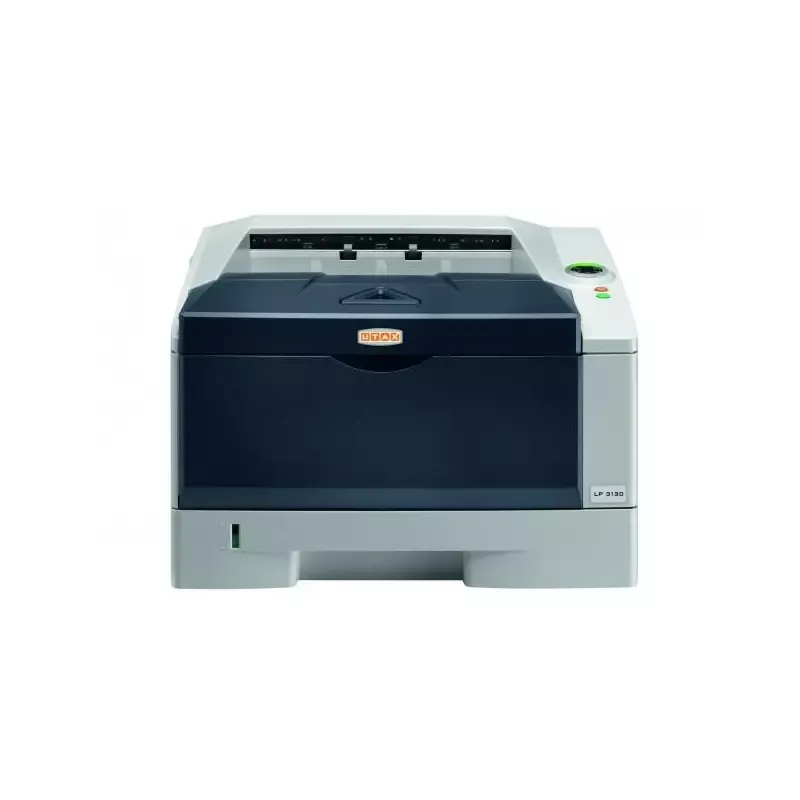
The black and gray design is sleek, but may not suit all office environments that favor more colorful designs.
Value for money
Although the price is competitive for the features offered, the 250-sheet paper capacity may be insufficient for high-volume offices.
Usability
Network connectivity via Ethernet is reliable, but the lack of Wi-Fi may pose issues in certain work environments.
Features
Features like built-in duplex printing and high print quality are major assets.
Robustness
The weight of 12 kg can make handling the printer difficult, especially in tight spaces.
Advantages
Fast printing: 35 pages per minute
Built-in duplex printing
Print quality: 1200 x 1200 DPI
Ethernet connectivity for shared network
Low power consumption in standby
Disadvantages
No Wi-Fi connectivity
Limited paper capacity of 250 sheets
Heavy weight, difficult to move
Slow duplex printing speed
Limited internal memory of 256 MB
Plain design, not suitable for everyone
Technical Specifications P-3521DN
General Information
-
ModelP-3521DN
-
Brand
-
Category
-
Type
-
SKU270609
-
MPN270609
Print speed
-
ColorNo
-
Maximum resolution1200 x 1200 DPI
-
Double-sided printingYes
-
Printing technologyLaser
-
Print speed (black, normal quality, A4/US Letter)35 ppm
-
Preheating time16.5 s
-
Copy time for the first page (Black, normal)8 s
-
Duplex printing speed (Black, normal quality, A4/US Letter)19 ppm
Features
-
Service cycle (Maximum)- pages per month
-
Number of print cartridges1
-
Languages of the page descriptionDiablo 630, IBM ProPrinter XL24E, PCL 5e, PCL 6, PCL XL
Input and output capacity
-
Total output capacity250 sheets
-
Input capacity of multi-purpose trays50 sheets
-
Total output capacity250 sheets
-
Multifunctional trayYes
Paper management
-
ISO, Format Series A (A0...A9)A4
-
Type of paper tray supportThicker paper
-
ISO, Format Series A (A0...A9)Thin paper
-
Weight of paper tray supportA4
-
Weight of the multifunctional tray support60 - 120 g/m²
-
Support weight supported in duplex mode60 - 220 g/m²
-
Maximum print format60 - 105 g/m²
-
216 x 356 mm
Network
-
Ready-to-use network-
-
Mobile printing technologies-
-
Ethernet/LANYes
-
WifiNo
Connectivity
-
Standard interfacesEthernet, USB 2.0
-
Quantity of USB 2.0 Ports1
Representation / realization
-
Internal memory256 MB
-
Memory locations1
-
Maximum internal memory1280 MB
-
Compatible memory cardsSD
-
Integrated into the processorYes
-
Sound pressure level (impression)47 dB
-
Sound power level (standby)30 dB
-
Processor frequency500 MHz
-
Processor familyPowerPC
-
Processor model465
-
Integrated into the processorYes
Design
-
Product colorBlack, Grey
-
Built-in screenYes
-
CertificationGS/TÜV, CE
Power
-
AC input voltage220 - 240 V
-
AC input frequency50 - 60 Hz
-
Average power consumption in Print mode499 W
-
Energy consumption (standby mode)6.2 W
-
Electricity consumption (stop)2.5 W
Sustainability
-
Sustainability certificatesENERGY STAR
Minimum system requirements
-
Support for the Windows operating systemWindows 7 Home Basic
-
Support for the Mac operating systemWindows 7 Home Basic x64
-
Support for the Linux operating systemWindows 7 Home Premium
-
Support for the server operating systemWindows 7 Home Premium x64
-
Support for other operating systemsWindows 7 Professional
-
Windows 7 Professional x64
-
Windows 7 Starter
-
Windows 7 Starter x64
-
Windows 7 Ultimate
-
Windows 7 Ultimate x64
-
Windows 8
-
Windows 8 Enterprise
-
Windows 8 Enterprise x64
-
Windows 8 Pro
-
Windows 8 Pro x64
-
Windows 8 x64
-
Windows 8.1
-
Windows 8.1 Enterprise
-
Windows 8.1 Enterprise x64
-
Windows 8.1 Pro
-
Windows 8.1 Pro x64
-
Windows 8.1 x64
-
Windows Vista Business
-
Windows Vista Business x64
-
Windows Vista Enterprise
-
Windows Vista Enterprise x64
-
Windows Vista Home Basic
-
Windows Vista Home Basic x64
-
Windows Vista Home Premium
-
Windows Vista Home Premium x64
-
Windows Vista Ultimate
-
Windows Vista Ultimate x64
-
Windows XP Home
-
Windows XP Home x64
-
Windows XP Professional
-
Windows XP Professional x64
-
Mac OS X 10.2 Jaguar
-
Mac OS X 10.3 Panther
-
Mac OS X 10.4 Tiger
-
Mac OS X 10.5 Leopard
-
Mac OS X 10.6 Snow Leopard
-
Mac OS X 10.7 Lion
-
Mac OS X 10.8 Mountain Lion
-
Mac OS X 10.9 Mavericks
-
Yes
-
Windows Server 2003
-
Windows Server 2008 R2
-
Windows Server 2012 R2
-
Novell NetWare 3.x
-
Novell NetWare 4.x
-
Novell NetWare 5.x
-
Novell NetWare 6.x
Weight and dimensions
-
Width375 mm
-
Depth393 mm
-
Height267 mm
-
Weight12000 g
Frequently Asked Questions
What is the weight of the Utax P-3521DN?
What is the recommended method for removing paper jammed in the printer?
Why does my printer not recognize original cartridges?
What could be the causes of poor print quality?
What is the difference between a laser printer and an inkjet printer?
Why does my inkjet printer leave black streaks on prints?
What does the acronym DPI mean?
What certifications does the Utax P-3521DN have?
How many cartridges can be installed in the Utax P-3521DN?
What is the height of the Utax P-3521DN?
What is the width of the Utax P-3521DN?
What is the depth of the Utax P-3521DN?
Is the manual for the Utax P-3521DN available in French?
Similar products


More product categories from brand Utax
More product types from brand Utax

Presentation of product P-3521DN specifications from brand Utax
General Information
The Utax P-3521DN printer, known for its reliability and innovation, is designed to deliver optimal performance in various work environments. This model, identified by the number P-3521DN | 4433503521, ensures a smooth and efficient user experience.
Print Speed
This printer does not offer color printing, focusing on monochrome printing, which may suit users looking to optimize their printing costs. With a maximum resolution of 1200 x 1200 DPI, it ensures sharp and precise prints, ideal for professional needs. The Utax P-3521DN is equipped with a duplex printing feature, allowing for paper savings and waste reduction. Its print speed reaches 35 pages per minute (ppm) in black and white, thus providing increased efficiency for daily tasks. The warm-up time of the device is 16.5 seconds, ensuring quick availability, while the first page print delay is only 8 seconds. In duplex mode, the speed is 19 ppm, which remains competitive but may be slower than some competitors.
Features
The maximum duty cycle of the Utax P-3521DN is designed for high volumes, thus meeting the demands of heavy users. The printer uses a single cartridge for printing, simplifying the management of consumables. Additionally, it is compatible with several page description languages, such as Diablo 630 and PCL, allowing for flexible use.
Input and Output Capacity
With a paper feed capacity of 250 sheets, the Utax P-3521DN can handle a significant amount of documents without interruption. The multifunction tray can hold up to 50 sheets, providing flexibility for different types of jobs. The output capacity is also 250 sheets, ensuring consistent performance.
Paper Management
This printer supports ISO A series paper sizes, with a maximum size of A4, ensuring compatibility with office standards. It is capable of handling various media, ranging from lightweight paper to thicker paper, with weights from 60 to 220 g/m², allowing for a wide range of printing applications.
Network
The network connectivity of the Utax P-3521DN is provided by an Ethernet port, facilitating its integration into corporate networks. However, the lack of Wi-Fi connectivity may limit its use in certain environments. The printer also supports several mobile printing technologies, offering flexibility for users of mobile devices.
Connectivity
It features a standard interface, including a USB 2.0 port, allowing for simple and quick connection with other devices.
Representation / Performance
The Utax P-3521DN is equipped with 256 MB of internal memory, sufficient for standard printing tasks. For larger needs, its memory can be expanded up to 1280 MB. The printer is also compatible with SD memory cards, facilitating data storage. Its operation occurs at a noise level of 47 dB during printing, ensuring a quiet work environment.
Design
The design of the Utax P-3521DN comes in black and gray, offering a modern aesthetic that fits well in various offices. Its built-in display makes it easy to navigate the device's options, while GS/TÜV and CE certifications ensure compliance with safety and performance standards.
Power
The printer operates with an input voltage of 220 to 240 V and a frequency of 50 to 60 Hz. In print mode, its power consumption is 499 W, while in standby, it consumes only 6.2 W, contributing to better energy efficiency.
Durability
Certified ENERGY STAR, the Utax P-3521DN meets high standards for energy efficiency, reflecting a commitment to environmentally friendly practices.
Minimum System Requirements
This printer is compatible with various operating systems, including several versions of Windows, Mac OS, and Linux, allowing for easy integration into different computing environments.
Weight and Dimensions
With a width of 375 mm, a depth of 393 mm, and a height of 267 mm, the Utax P-3521DN is positioned as a compact yet robust device. Its weight of 12 kg may make it somewhat difficult to move, especially in tight spaces.


